Chapter 8: Multimodal Information Extraction & Capstone
Learning Objectives
By the end of this chapter, you will be able to:
-
Extract structured information from multimodal content using Content Understanding, combining OCR, layout analysis, and field extraction.
-
Produce clean grounded representations (markdown or structured JSON) that downstream agents and RAG pipelines can reason over.
-
Architect and justify an agentic multimodal solution with explicit design tradeoffs.
-
Communicate that solution through a technical design document and a recorded walkthrough.
8.1 Introduction: From Raw Content to Grounded Insight
In Chapter 7, you learned how multimodal models interpret images alongside text, generate and edit visual content, and reason across modalities. This chapter narrows that capability to a specific, high-value problem: turning messy, real-world documents and multimodal files into clean, structured representations that an agent or a retrieval pipeline can actually use.
Consider this scenario. A regional healthcare system — Piedmont Health Partners — operates twelve clinics and three hospitals across the Charlotte metro area. Every day, the system ingests thousands of documents: discharge summaries from inpatient stays, insurance claim forms from multiple payers, lab reports from reference laboratories, referral letters from external physicians, and patient intake forms filled out on paper or tablets. Many arrive as scanned PDFs or photographs; some packets mix typed pages, handwritten notes, embedded card images, and tables in a single file. Each document contains critical information — patient identifiers, diagnosis codes, medication lists, insurance policy numbers, procedure dates — that must be extracted, validated, and made available to downstream systems.
The hard part is that this content is unstructured and multimodal. A discharge summary is not a tidy row in a database; it is prose, tables, checkboxes, and signatures spread across pages. Before any agent can answer "What medications was this patient discharged on?" or before a RAG pipeline can ground an answer in the chart, the content has to be transformed into a representation a model can reliably read.
That transformation is the focus of AI-103’s information extraction domain, and the service at its center is Content Understanding. Content Understanding takes multimodal inputs — documents, images, audio, and video — and produces structured insights: clean markdown that preserves layout and reading order, or structured JSON with the specific fields your workflow needs. These outputs are grounded representations: faithful, machine-readable renderings of the source that an agent can cite and a retrieval index can chunk.
This is also the chapter where the threads of the whole course come together. Content Understanding’s grounded output feeds the RAG patterns from Chapter 2 and the Foundry IQ knowledge layer from Chapter 4. The extracted content becomes input to the tools and agents you built in Chapter 3 and orchestrated in Chapter 5. And the capstone asks you to architect an agentic multimodal solution that draws on everything from model deployment and evaluation in Chapter 1 onward.
Here is the roadmap:
-
Section 8.2 introduces Content Understanding and the multimodal extraction pipeline: OCR, layout analysis, and field extraction working together.
-
Section 8.3 shows how analyzers produce grounded representations — markdown and structured JSON — and how to build a Content Understanding client application.
-
Section 8.4 connects extraction output to retrieval and grounding: feeding RAG and agent tools, with callbacks to Chapter 2 and Foundry IQ in Chapter 4.
-
Section 8.5 steps back to survey multi-service architecture design and the discipline of justifying your choices.
-
Section 8.6 prepares you for the capstone: an agentic multimodal solution expressed as a technical design document and a recorded walkthrough.
-
Sections 8.7 through 8.9 connect the chapter to labs, key terms, and a course conclusion.
8.2 Content Understanding: Multimodal Information Extraction
Azure AI Content Understanding (part of Microsoft Foundry) is a service purpose-built for turning multimodal data into structured insight. You point it at content — a PDF, an image, an audio file, a video, or a mixed-format document — and it returns a structured representation: text in reading order, detected layout elements, and the specific fields you asked it to extract, each with confidence information.
8.2.1 Why Extraction Comes Before Reasoning
A multimodal model can look at an image of a form and describe it. But production pipelines need something stronger than a description: they need a reliable, structured, repeatable extraction that the same downstream code can consume every time. That is what an extraction pipeline provides.
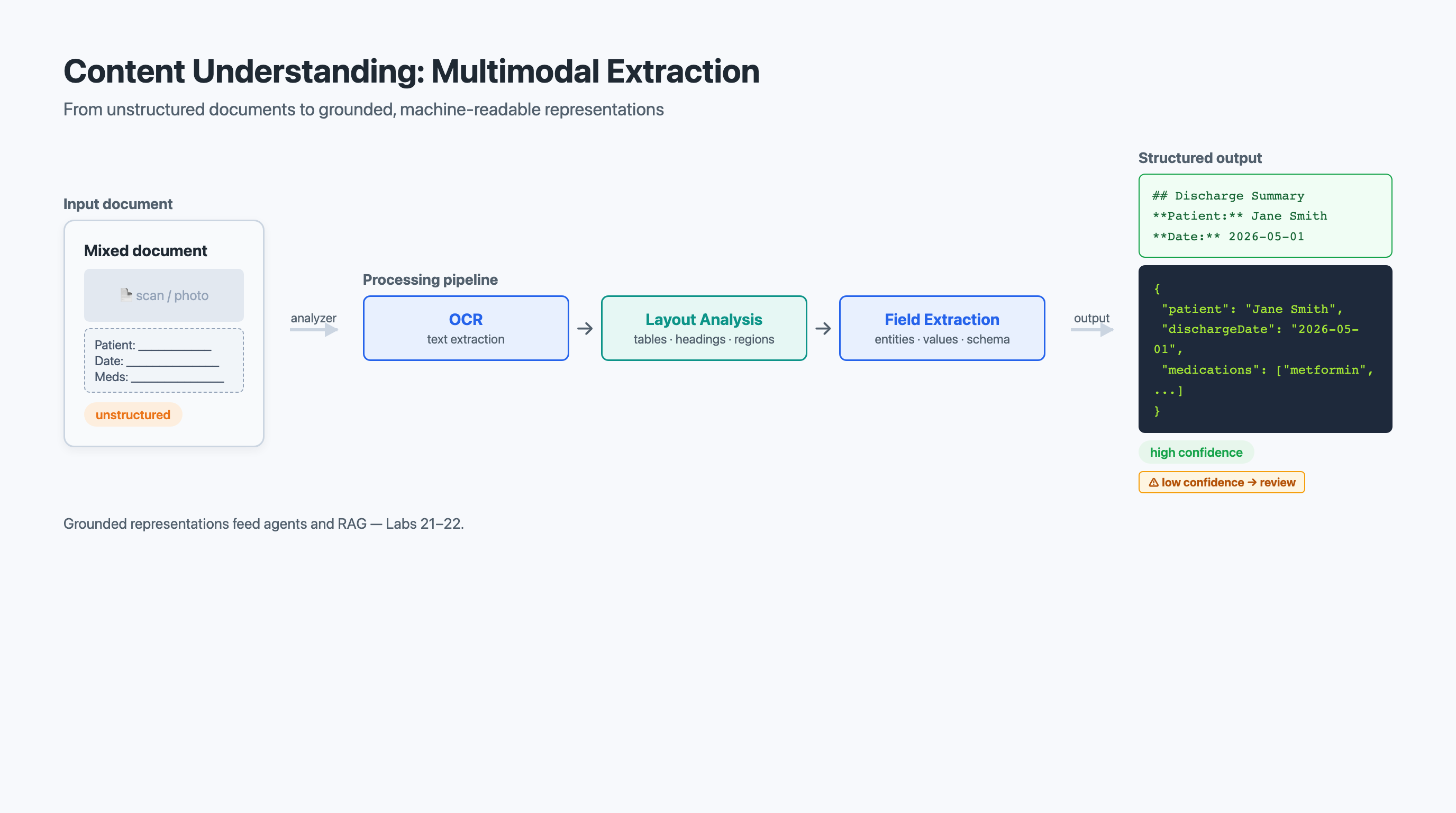
Consider a discharge summary that arrives as a scanned PDF. Raw optical character recognition (OCR) finds the text in the image and returns it as strings with bounding regions. That is necessary but not sufficient. OCR alone returns "John Smith" and "01/15/2026" and "Community-acquired pneumonia" as disconnected strings without knowing that the first is a patient name, the second is a discharge date, and the third is a primary diagnosis. It also loses the document’s structure — which lines form a table, which text is a heading, what reading order makes the prose coherent.
Content Understanding adds the layers OCR is missing. On top of OCR it performs layout analysis — identifying paragraphs, reading order, tables, selection marks, and section headings — and field extraction — mapping the recognized content to named fields you define. The result is not a wall of text; it is a structured, labeled rendering of the document.
8.2.2 The Multimodal Extraction Pipeline: OCR, Layout, Field Extraction
Multimodal extraction describes the combined pipeline that Content Understanding runs over an input:
-
OCR. Detect and read text wherever it appears — printed, handwritten, embedded in an image, or rendered in a PDF. OCR returns the characters and their positions.
-
Layout analysis. Reconstruct document structure: paragraphs and reading order, tables (with rows, columns, spanning cells, and headers), selection marks (checkboxes and radio buttons with their checked state), and headings that reveal the document’s organization. Layout analysis is what lets the pipeline emit a discharge summary as coherent markdown rather than scrambled lines.
-
Field extraction. Map the recognized, laid-out content to the specific fields your workflow needs —
PatientName,DischargeDate,PrimaryDiagnosis, the medication table, the insurer and member ID — producing structured JSON alongside or instead of the markdown.
For Piedmont Health Partners, this pipeline handles the full variety of intake: a typed referral letter, a photographed insurance card, a checkbox-laden consent form, and a tabular lab report can all flow through the same extraction step and emerge as structured, labeled output.
8.2.3 Analyzers: Configuring What to Extract
In Content Understanding, the unit of configuration is the analyzer. An analyzer defines what the service should produce for a given kind of content: whether to emit markdown, structured JSON, or both; which fields to extract and their expected types; and any schema describing the shape of the result. You can use general-purpose analyzers that produce broad layout-aware output, or define an analyzer with a field schema tailored to a document type.
This is a meaningful shift from older, training-heavy extraction tools. Rather than collecting and labeling dozens of sample documents to train a bespoke model per form type, you describe the fields you want and let the analyzer’s multimodal model extract them, refining the schema as you observe results. The emphasis moves from training a model to specifying an output.
|
Content Understanding (GA 2025-11-01) consolidates several capabilities that used to live in separate services — standalone OCR, the document-extraction service formerly branded Document Intelligence, and bespoke enrichment pipelines — into a single multimodal analyzer model. If you encounter older Azure samples referencing those separate services, treat them as historical: AI-103 expects you to reach for Content Understanding for multimodal extraction. |
8.2.4 Confidence and Human-in-the-Loop Review
Extraction is never perfect on real-world inputs — faded scans, unusual layouts, and difficult handwriting all introduce uncertainty. Content Understanding surfaces confidence information on its extractions, and you use it to decide what to accept automatically and what to route for review.
A high confidence on a MemberID field means the analyzer is sure it found and read the member ID correctly. A low confidence means it found something that might be the member ID but is uncertain — perhaps the text was partially obscured. This enables a human-in-the-loop workflow: documents whose critical fields all clear your confidence threshold flow through automatically, while documents with one or more low-confidence fields go to a review queue for a human to verify or correct.
|
Set confidence thresholds by field criticality, not a single global cutoff. In healthcare extraction, a medication dosage warrants a stricter threshold than a mailing address, because the cost of an undetected error is far higher. Tie the threshold to the downstream consequence of a wrong value. |
8.3 Grounded Representations and the Content Understanding Client
The output of extraction is only useful if downstream systems can consume it cleanly. This section looks at the two shapes that output takes — markdown and structured JSON — and at building a Content Understanding client application (Lab 22) that produces them.
8.3.1 Markdown vs. Structured JSON: Two Grounded Representations
A grounded representation is a faithful, machine-readable rendering of a source document that a model can reason over and cite. Content Understanding produces two complementary forms:
-
Clean markdown. The document re-expressed as markdown that preserves headings, reading order, tables, and lists. Markdown is ideal as RAG context: it chunks cleanly, keeps tabular relationships intact, and is exactly the kind of grounded text a generative model reads well. A discharge summary rendered as markdown can be chunked, embedded, and indexed so an agent can ground an answer in the actual chart rather than hallucinating.
-
Structured JSON. The specific fields your workflow defined, returned as typed key-value data (and nested structures for tables and repeating items). JSON is ideal when a system — not a language model — is the consumer: populating a database, triggering a claims workflow, or filling an electronic health record.
Most real pipelines use both: markdown to ground an agent’s natural-language reasoning, and JSON to drive deterministic downstream automation. The two are not competing; they are the language-model-facing and the system-facing views of the same extraction.
8.3.2 Building a Content Understanding Client Application
A Content Understanding client application wraps the analyzer in code your systems can call: submit content, poll for the result, and consume the markdown or JSON. The pattern is straightforward — authenticate, choose or create an analyzer, submit the file or URL, retrieve the structured result — but the value is in what you do with the output: route low-confidence fields to review, hand markdown to a retrieval index, and feed JSON into business logic.
The following example illustrates the shape of a Content Understanding client. It authenticates against a Foundry resource, runs an analyzer over a document, and consumes both the markdown and the extracted fields.
|
The code below is illustrative. Content Understanding’s SDKs (Python, .NET, Java, JavaScript) are evolving, and exact class names, method names, and response shapes vary by SDK version and API version. Treat this as a faithful sketch of the workflow — authenticate, run an analyzer, read markdown plus fields, gate on confidence — and confirm precise symbols against the SDK version you install. Do not copy these names as authoritative APIs. |
import os
from azure.ai.contentunderstanding import ContentUnderstandingClient  (1)
from azure.core.credentials import AzureKeyCredential

# Authenticate against your Foundry / Content Understanding resource
endpoint = os.environ["AZURE_CONTENT_UNDERSTANDING_ENDPOINT"]
key = os.environ["AZURE_CONTENT_UNDERSTANDING_KEY"]
client = ContentUnderstandingClient(endpoint=endpoint,
                                    credential=AzureKeyCredential(key))

# Run an analyzer over a multimodal document. The analyzer ("clinical-intake")
# was configured to emit clean markdown AND extract named fields.
document_url = "https://example.com/intake/patient-packet-2026-0847.pdf"

poller = client.begin_analyze(                      (2)
    analyzer_id="clinical-intake",
    input={"url": document_url},
)
result = poller.result()

# 1) Grounded markdown -- the representation you hand to RAG / an agent
grounded_markdown = result.markdown                 (3)
print(grounded_markdown[:500])

# 2) Structured JSON fields -- the representation that drives automation
for name, field in result.fields.items():           (4)
    print(f"{name}: {field.value} (confidence: {field.confidence:.2f})")

    # Gate low-confidence critical fields for human review
    if field.confidence is not None and field.confidence < 0.7:
print(f" ** REVIEW NEEDED: {name} = '{field.value}'")| 1 | Import path and client name are version-dependent; verify against your installed SDK. |
| 2 | Extraction is a long-running operation, so the client returns a poller. |
| 3 | result.markdown is the grounded representation you chunk and index for RAG. |
| 4 | result.fields is the structured JSON view; each field carries a value and confidence. |
8.3.3 Lab 21: Extracting from Truly Multimodal Content (Optional)
Documents are one input type, but Content Understanding spans modalities — images, audio, and video as well. Lab 21 (Optional) — Extract information from multimodal content lets you push beyond documents: extracting structured insight from content that mixes text, images, and other modalities, and observing how a single analyzer can produce a unified grounded representation across them. Treat it as the breadth complement to the depth you build in Lab 22.
8.4 From Extraction to Retrieval and Grounding
Extraction does not exist for its own sake; its purpose is to feed reasoning. This short section ties the grounded representations you produce in Sections 8.2-8.3 back to the retrieval and agent patterns you built earlier in the course.
The connection is direct. In Chapter 2, you built retrieval-augmented generation: chunk source content, embed it, retrieve relevant chunks at query time, and ground a model’s answer in them. Content Understanding’s markdown output is the ideal input to that pipeline — it is already clean, layout-aware text, so the chunks you embed faithfully represent the source instead of carrying OCR noise or scrambled table cells.
In Chapter 4, you connected agents to knowledge through Foundry IQ and to capabilities through tools and MCP. Extraction sits upstream of both. A claims-processing agent might call a Content Understanding analyzer as a tool to turn an uploaded form into JSON, then consult Foundry IQ knowledge that was itself built from extracted, grounded documents. The agent reasons; Content Understanding ensures it reasons over faithful, structured inputs rather than raw pixels.
|
The retrieval and knowledge layer — indexing, hybrid and vector search, and Foundry IQ — was covered in depth in Chapter 4. This chapter does not re-teach search internals. The point here is integrative: extraction produces the grounded content that retrieval and agents consume. When you design your capstone, treat Content Understanding as the front door that turns raw multimodal input into something your Chapter 2 RAG pipeline and Chapter 4 Foundry IQ knowledge can stand on. |
8.5 Putting It All Together: Multi-Service Solution Architecture
Across eight chapters you have worked with the breadth of Microsoft’s AI platform: generative models and evaluation, RAG and responsible AI, agents and tools, MCP and Foundry IQ knowledge, multi-agent orchestration, text and speech, multimodal vision, and now multimodal extraction. This section steps back to survey the landscape and to practice the discipline of combining services into coherent, justified solution architectures.
8.5.1 Revisiting the Platform with Eight Chapters of Context
In Chapter 5, you encountered the broader service catalog and learned to categorize capabilities. Now, with hands-on experience, you can evaluate those services with genuine understanding rather than surface familiarity.
You know that generative models provide flexible reasoning but at higher per-token cost and variable latency. You know that dedicated services — text analysis, speech, vision, and Content Understanding extraction — provide optimized, lower-cost processing for specific tasks. You know that Foundry IQ and retrieval connect stored knowledge to generative reasoning. And you know that agents orchestrate these pieces into workflows that accomplish complex goals. That depth is what separates an effective AI solution architect from someone who simply lists services: you know not just what each service does but when it is the right choice and how it interacts with the others.
8.5.2 Common Integration Patterns
Several integration patterns recur across modern AI solution architectures:
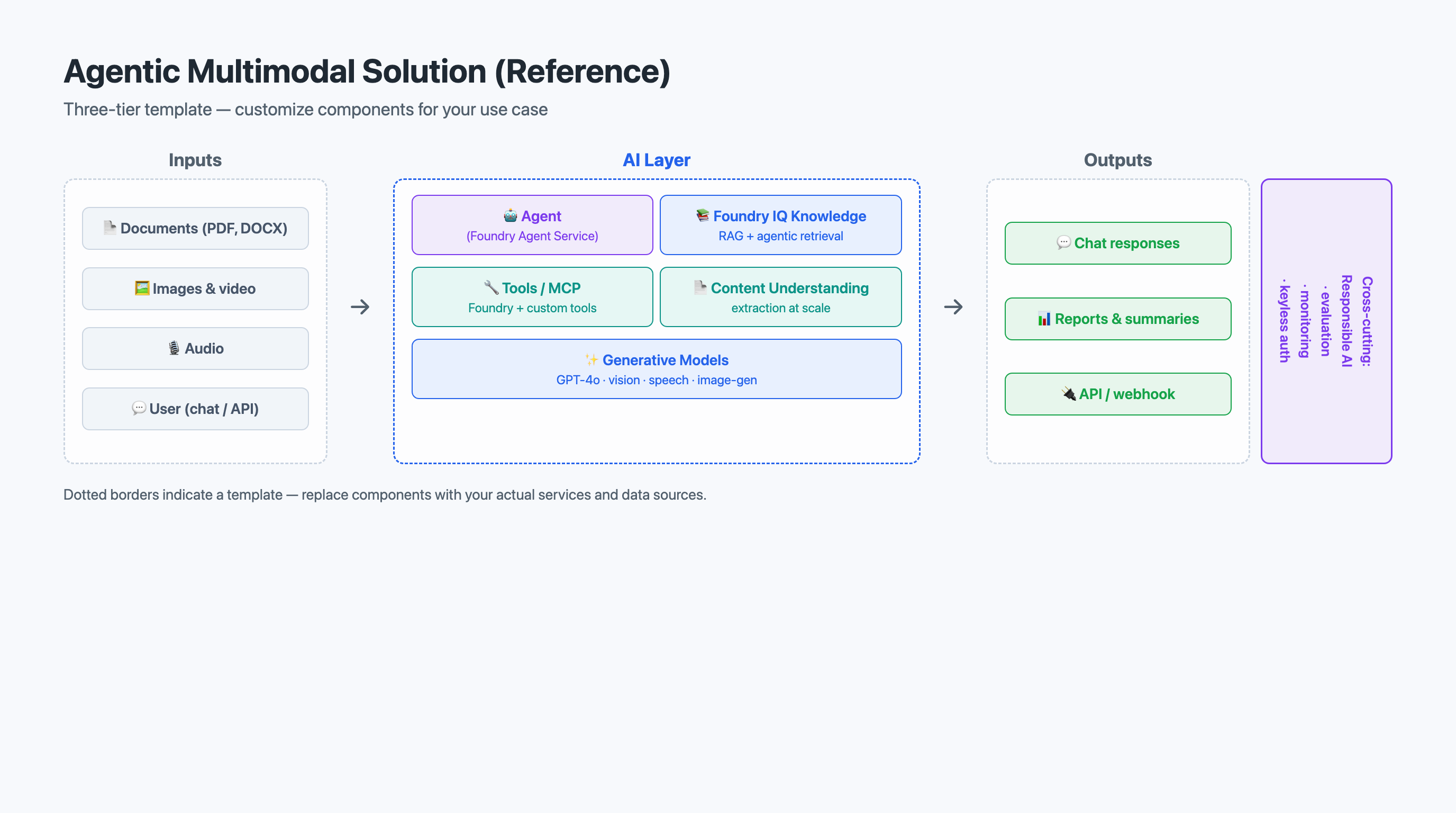
Extraction-to-grounding pipeline. Multimodal content arrives in storage. Content Understanding extracts clean markdown and structured fields. The markdown is chunked and indexed for retrieval; the JSON drives downstream automation. This pattern underlies claims intake, chart digitization, and any "turn documents into knowledge" workflow.
Agentic RAG. An agent receives a question, retrieves grounded content (extracted and indexed earlier), and synthesizes an answer it can cite — escalating to tools or human review when confidence is low. This pattern powers clinical assistants, enterprise knowledge agents, and research copilots.
Multimodal agent with tools. An agent calls Content Understanding as a tool to process an uploaded file mid-conversation, consults Foundry IQ knowledge, and invokes additional tools/MCP servers to act on the result. This pattern handles "upload this form and tell me what to do next" experiences.
Real-time analysis pipeline. Streaming inputs — messages, transcripts, tickets — flow through text and speech analysis for entities, sentiment, and classification, with results stored and visualized. This pattern supports experience monitoring and operational dashboards.
8.5.3 Design Tradeoff Categories
Every architecture decision involves tradeoffs. The four most common categories in AI solutions are:
Accuracy vs. cost. Richer extraction or a larger generative model improves quality but raises cost and latency; a leaner approach is cheaper but may need more downstream validation. The right balance depends on the cost of an error in your domain.
Latency vs. capability. Generative reasoning is flexible but slower per request; dedicated services return structured results faster. When a user is waiting, latency matters; when a batch pipeline runs overnight, capability matters more.
Specify-and-extract vs. general-purpose. A tightly specified analyzer schema yields precise, ready-to-use fields but must be maintained as documents evolve; a general-purpose, layout-aware extraction is more robust to variation but pushes interpretation downstream. Start general, observe, and tighten the schema only where precision pays off.
Complexity vs. maintainability. More services add capability but also operational burden — more endpoints to monitor, more credentials to manage, more failure points. A focused architecture with fewer services is easier to deploy, debug, and maintain.
8.5.4 Justifying Design Decisions: The "Why" Matters More Than the "What"
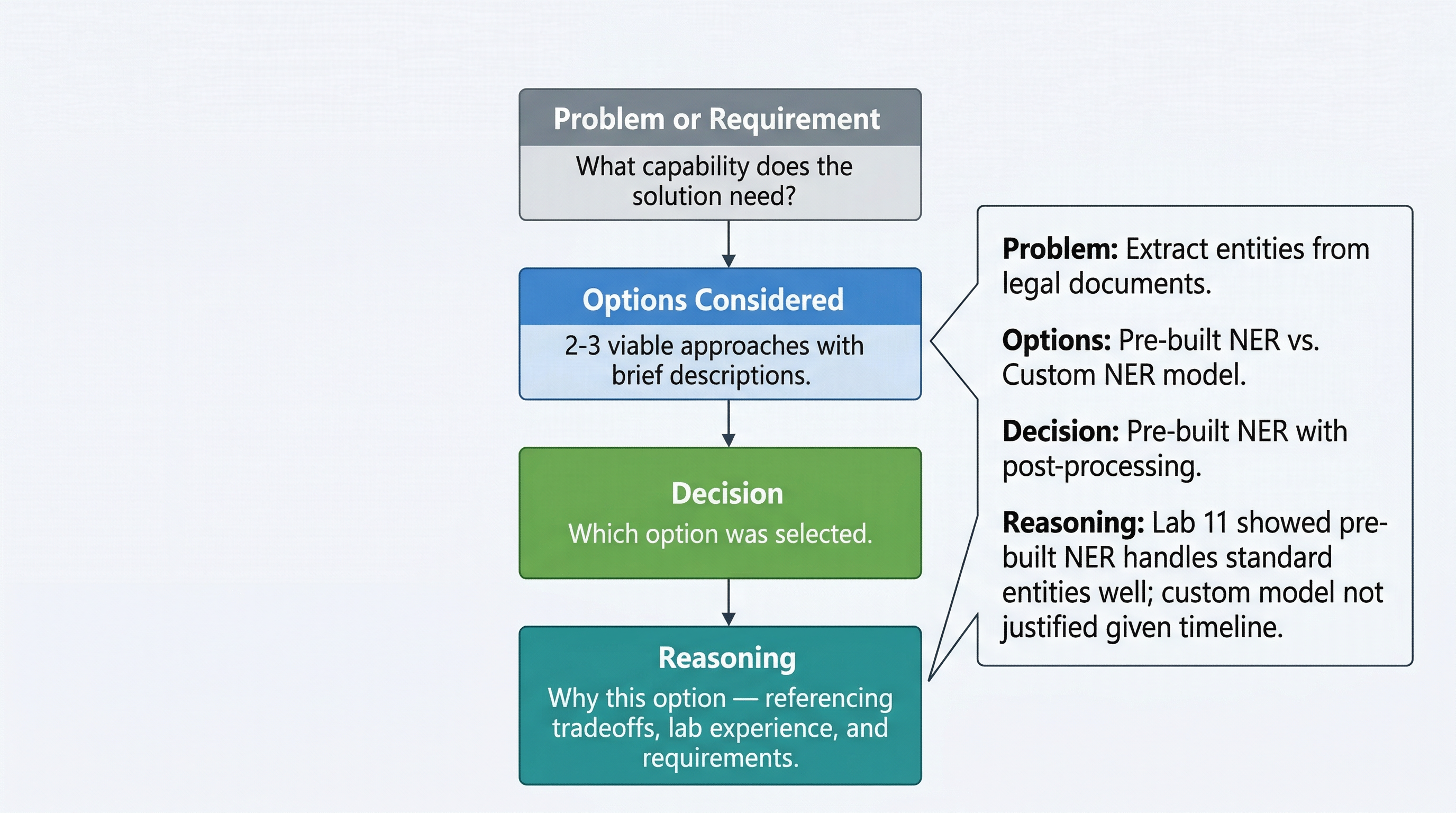
In professional practice and in this course’s capstone, stating what services you chose is insufficient. You must explain why. A strong design justification follows a four-part structure:
-
Problem — What specific capability does the solution need?
-
Options — What services could provide that capability?
-
Choice — Which did you select?
-
Reasoning — Why is it the best fit, and why are the alternatives less suitable?
For example: "The solution must turn mixed-format patient intake packets — scanned forms, photographed insurance cards, handwritten notes — into both grounded text for an agent and structured fields for the EHR (problem). A general multimodal model with a custom prompt, or a Content Understanding analyzer, could attempt this (options). We chose a Content Understanding analyzer (choice) because it produces layout-aware markdown and schema-typed JSON with field-level confidence in one pass, enabling automatic gating to human review — whereas a raw prompt-based approach gives us neither reliable structure nor confidence signals at our volume (reasoning)."
That level of justification demonstrates genuine understanding. It shows you considered alternatives and made a deliberate, informed choice.
8.5.5 Architecture Documentation
A well-documented architecture includes:
-
Architecture diagram showing services, data flows, and integration points.
-
Service selection justification for each service, following the problem-options-choice-reasoning structure.
-
Data flow description explaining how information moves from input to output — including where extraction produces grounded representations and where they are consumed.
-
Responsible AI considerations addressing fairness, transparency, privacy, reliability, and safety for the specific use case.
-
Operational plan covering monitoring, error handling, scaling, and cost management.
|
A well-justified three-service architecture scores higher than a shallow seven-service one. Depth of reasoning demonstrates understanding; breadth without justification demonstrates only awareness. Include only the services your solution genuinely needs, and explain why each earned its place. |
8.6 Capstone: An Agentic Multimodal Solution
In Chapter 5, you wrote a capstone proposal identifying a real-world problem and sketching an AI solution. Now you expand that proposal into a full technical design document for an agentic multimodal solution — a system in which an agent reasons over grounded, multimodal inputs to accomplish a real task.
8.6.1 What "Agentic Multimodal" Means Here
Your capstone is not a single API call. It is an agent that:
The design document transforms your earlier outline into a detailed, justified architecture. Think of the proposal as the elevator pitch and the design document as the engineering blueprint. Every vague statement becomes concrete: "The solution will process documents" becomes "An intake agent calls a Content Understanding analyzer to convert each uploaded packet into grounded markdown and typed JSON, indexes the markdown for retrieval, and gates fields below a confidence threshold to a human review queue."
8.6.2 Required Components Checklist
Your technical design document must include:
-
Executive Summary — A one-paragraph overview of the problem and solution for a non-technical audience.
-
Problem Statement — A clear description of the business problem: who is affected, what the current process looks like, and why an agentic AI solution is appropriate.
-
Solution Architecture — A diagram and narrative of the overall design, showing all services and how they connect, with the agent, knowledge/retrieval, tools/MCP, and Content Understanding extraction clearly placed.
-
Service Selection Justification — For each service, a problem-options-choice-reasoning justification (Section 8.5.4).
-
Design Tradeoffs — An explicit discussion of at least three tradeoffs you navigated, explaining what you gained and what you sacrificed.
-
Responsible AI Considerations — An analysis of fairness, transparency, privacy, reliability, and safety specific to your solution, with concrete mitigations.
-
Implementation Roadmap — A phased plan showing which components you would build first and why, including dependencies.
-
References — Citations to documentation, course materials, and labs that support your design decisions.
8.6.3 Writing Design Justifications: Problem, Options, Choice, Reasoning
The strongest design documents demonstrate a clear decision process for every service selection. Use the four-part structure consistently:
Problem. State the capability need concretely: "The system must convert intake packets from 47 referring offices — typed, scanned, and photographed — into grounded text and typed fields."
Options. List the viable services honestly: "A Content Understanding analyzer, or a general multimodal model with a structured-output prompt."
Choice. State your selection: "We selected a Content Understanding analyzer."
Reasoning. Explain why: "The analyzer emits layout-aware markdown for our RAG layer and schema-typed JSON with field-level confidence for the EHR in a single pass, enabling automatic human-in-the-loop gating. A prompt-based approach would give us neither reliable structure nor confidence signals, and would cost more at our volume."
8.6.4 The Recorded Walkthrough: Presenting Architecture in 5-7 Minutes
The recorded walkthrough is a 5-7 minute video where you present your architecture, explain your design decisions, and demonstrate your understanding of the services and tradeoffs. This is not a script reading — it is a professional presentation where you walk through your architecture diagram and explain your thinking.
Structure your walkthrough:
-
Minutes 1-2: Problem statement and solution overview. What problem are you solving and for whom? What is the high-level agentic architecture?
-
Minutes 2-4: Service walkthrough. Walk through each service — the agent, knowledge/retrieval, tools/MCP, and Content Understanding extraction — explaining what it does in your solution and why you chose it over alternatives.
-
Minutes 4-6: Design tradeoffs and responsible AI. Discuss the key tradeoffs you navigated and the responsible AI considerations you addressed.
-
Minutes 6-7: Implementation roadmap and conclusion. How would you phase the implementation, and what are the most critical risks?
Practice before recording. A confident, clear delivery demonstrates mastery far more effectively than a rushed or hesitant one.
8.6.5 Common Capstone Pitfalls
Pitfall 1: Listing services without justification. Naming an agent, a knowledge layer, and an extraction analyzer without explaining why each is needed. Every service must earn its place.
Pitfall 2: Ignoring tradeoffs. Presenting your architecture as the only possible approach. Strong design documents acknowledge alternatives and explain why they were not selected.
Pitfall 3: Vague responsible AI discussion. "The solution will be fair and transparent" without specifics. Name the concrete risks — what could go wrong with your solution — and the specific mitigations you implement.
Pitfall 4: Overcomplicating the architecture. Including services you do not understand deeply just to appear comprehensive. A focused solution with three well-justified services beats a sprawling one with seven poorly understood ones.
Pitfall 5: Disconnecting from labs and course content. Your design should demonstrate skills you built through hands-on practice. Reference specific labs and concepts to show your architecture is grounded in real experience.
|
Reference specific labs to strengthen your justifications. For example: "We selected a Content Understanding analyzer based on Lab 22, where the analyzer produced clean markdown and confidence-scored fields from mixed-format documents in a single pass." Connecting design decisions to hands-on experience demonstrates practical understanding. |
8.7 Hands-On Connections
This chapter’s labs give you direct experience with multimodal extraction and the Content Understanding client. Together they complete the hands-on skill set you need for the capstone.
Lab 21: Extract Information from Multimodal Content (Optional). You will run extraction over content that combines multiple modalities — text, images, and structured elements — and observe how a single analyzer produces a unified grounded representation. Watch for:
-
How different modalities surface in the same structured output, and what reading order the analyzer reconstructs.
-
Where confidence drops on harder inputs (handwriting, low-quality scans) and what that implies for review gating.
-
How the markdown view and the field view differ for the same source.
Lab 22: Develop a Content Understanding Client Application. You will build a client that authenticates, runs an analyzer, and consumes both the markdown and the extracted JSON fields. This is the hands-on counterpart to Sections 8.2-8.3. Watch for:
-
The difference between the long-running submit/poll pattern and a synchronous call.
-
How you configure or select an analyzer to emit markdown, structured fields, or both.
-
How you would route low-confidence fields to a human-in-the-loop queue.
-
How the markdown output would feed a downstream RAG index (a callback to Chapter 2).
8.8 Key Terms
- Content Understanding
-
A Microsoft Foundry service that turns multimodal data — documents, images, audio, and video — into structured insights, producing clean markdown and/or structured JSON through configurable analyzers.
- analyzer
-
The unit of configuration in Content Understanding that defines what to extract from a given kind of content — the output format (markdown, JSON, or both) and the schema of fields to return.
- multimodal extraction
-
The combined pipeline of OCR, layout analysis, and field extraction that transforms unstructured, mixed-modality content into a structured representation.
- field extraction
-
The step that maps recognized, laid-out content to named, typed fields defined by an analyzer, producing structured JSON with values and confidence.
- grounded representation
-
A faithful, machine-readable rendering of a source — clean markdown or structured JSON — that an agent can reason over and cite and that a retrieval pipeline can chunk and index.
- confidence score
-
A numeric value indicating how certain a model is about an extracted field, used to decide whether to accept the extraction automatically or flag it for human review.
- human-in-the-loop
-
A workflow pattern where AI handles high-confidence extractions automatically while routing low-confidence results to human reviewers, balancing automation speed with data quality.
8.9 Chapter Summary & Course Conclusion
This chapter centered on information extraction: turning messy, multimodal content into clean, grounded representations that agents and retrieval pipelines can trust. You saw why extraction must precede reasoning, and how Content Understanding combines OCR, layout analysis, and field extraction into a single multimodal extraction pipeline. You learned that analyzers let you specify the output you want — clean markdown for grounding, structured JSON for automation, or both — and that confidence signals enable human-in-the-loop review on the fields that matter most. You connected those grounded representations back to the RAG patterns of Chapter 2 and the Foundry IQ knowledge layer of Chapter 4, and you practiced the discipline of designing and justifying a multi-service architecture.
Course Arc: From a Single Model to Agentic Multimodal Solutions
Take a moment to appreciate how far you have come. In Chapter 1 — Foundations: Models, Deployment & Evaluation — you deployed your first model, sent your first completion, and learned to measure quality. In Chapter 2 — Grounding with RAG & Responsible AI — you grounded model responses in your own data and built responsible-AI guardrails. In Chapter 3 — Building AI Agents: Tools & Functions — you gave agents tools and functions to act. In Chapter 4 — Agent Knowledge & Protocols: MCP & Foundry IQ — you connected agents to knowledge and to capabilities through standardized protocols. In Chapter 5 — Agent Frameworks & Multi-Agent Orchestration — you coordinated multiple agents into workflows. In Chapter 6 — Text Analysis & Conversational Speech Agents — you worked with language and voice. In Chapter 7 — Vision: Multimodal Understanding & Image Generation — you reasoned across images and generated visual content. And in this chapter, you turned multimodal content into grounded representations that feed it all back into agents and retrieval.
You started by calling a single API. You are now designing agentic multimodal solutions that combine generative reasoning, knowledge and retrieval, tools, and extraction into coherent systems. That progression — from consumer of a single service to architect of integrated, agentic systems — is the core learning journey of this course.
AI-103 Certification Connection
This course aligns to Microsoft AI-103: Azure AI App and Agent Developer Associate, the credential for developers who build AI applications and agents on Azure. (AI-102, the prior Azure AI Engineer Associate exam, retired 2026-06-30; AI-103 is its successor for the app-and-agent developer path.) The exam spans five domains:
-
Plan and manage an Azure AI solution (25-30%)
-
Implement generative AI and agentic solutions (30-35%)
-
Implement computer vision solutions (10-15%)
-
Implement text analysis solutions (10-15%)
-
Implement information extraction solutions (10-15%)
The chapters and labs of this course map directly onto these domains: planning and evaluation (Ch1), generative and agentic solutions (Ch2-5), text and speech (Ch6), vision (Ch7), and information extraction (this chapter). If you have engaged deeply with the material, you have built a strong foundation for the certification. Consider pursuing it as a professional credential that validates the skills you have developed.
Moving Forward
The field of AI moves fast. The services you learned will evolve — new models, new capabilities, new best practices. But the fundamentals are durable. The discipline of producing grounded, structured inputs before asking a model to reason will apply to services that do not yet exist. The habit of justifying design decisions with structured reasoning will serve you in any technology role. And the practice of considering responsible AI implications will only grow more important as AI systems become more powerful and pervasive.
You have built something valuable in this course: not just technical skills, but a way of thinking about AI systems — how to evaluate them, how to combine them, how to justify your choices, and how to consider their impact on real people. Carry that forward into your careers, your projects, and your continuing education.
The capstone project is your opportunity to demonstrate everything you have learned. Approach it with confidence. You have the knowledge, the hands-on experience, and the analytical framework to design a strong agentic multimodal solution. Make it yours.