Chapter 4: Agent Knowledge & Protocols: MCP & Foundry IQ
Learning Objectives
By the end of this chapter, you will be able to:
-
Explain the Model Context Protocol (MCP) and connect an agent to tools exposed by an MCP server.
-
Explain agentic retrieval and integrate an agent with a Foundry IQ knowledge base.
-
Contrast a Foundry IQ knowledge base with the hand-built RAG pipeline from Chapter 2.
4.1 Introduction: Giving Agents Tools and Knowledge They Did Not Build
In Chapter 3, you built agents that called tools you defined and deployed alongside your own application code. You wrote each tool definition by hand, implemented the handler function, and traced the tool-call lifecycle from proposal to execution to result. Every capability your agent had was a capability you authored. That is a fine starting point, but production enterprises rarely work this way.
Consider the following scenario. A large insurance company wants to build an AI agent that helps claims adjusters process new claims faster. To do its job, the agent needs two very different things. First, it needs to act on systems it does not own: a CRM maintained by the sales engineering team that stores policyholder information, a ticketing system maintained by the IT operations team that tracks claim status and assignments, and a billing platform maintained by finance. Second, it needs to know things grounded in the company’s own documents: thousands of pages of policy language, regulatory guidelines, and precedent rulings spread across SharePoint sites, a document archive in Azure Blob Storage, and a public regulatory web portal.
If you applied the Chapter 3 approach directly, you would hand-write a tool definition and handler for every endpoint across the CRM, ticketing, and billing systems — and you would hand-build a retrieval pipeline (chunking, embedding, indexing, querying, reranking) over every document source, exactly as you did in Chapter 2. When the sales engineering team changes their CRM API, your agent breaks. When the compliance team adds a new document category, you re-run your ingestion pipeline. You become the bottleneck for every upstream change, and your agent’s reliability depends on keeping up with several teams' release schedules at once.
This chapter introduces two technologies that change that equation — one for tools the agent acts on, one for knowledge the agent reasons over.
First, the Model Context Protocol (MCP) is an open standard that lets an agent discover and call tools exposed by external services through a single, uniform interface. MCP decouples your agent from the implementation details of each tool provider, much as HTTP decoupled web browsers from the implementation details of web servers. A team publishes an MCP server, your agent connects to it, and the agent learns what tools exist and how to call them — at runtime, without you writing a line of integration code per tool.
Second, Foundry IQ is a managed knowledge layer for agents, built on Azure AI Search. Instead of hand-building the RAG pipeline you assembled in Chapter 2, you assemble a knowledge base from multiple knowledge sources and attach it to your agent. Foundry IQ performs agentic retrieval — it treats retrieval itself as a reasoning task, decomposing a question into subqueries, searching multiple sources in parallel, reranking the results, and returning grounded answers with citations.
Together, MCP and Foundry IQ move you from hand-crafted, tightly coupled integrations toward standardized, maintainable, knowledge-rich agents. Over this chapter you will learn how MCP works and how to connect an agent to MCP server tools (Lab 8), and how Foundry IQ’s agentic retrieval works and how to attach a knowledge base to an agent (Lab 9). This is the middle of the three-chapter agent arc: Chapter 3 gave your agents tools they built; this chapter gives them protocols and knowledge they did not build; Chapter 5 will give them frameworks and the ability to work in teams.
4.2 The Model Context Protocol (MCP)
4.2.1 The Problem MCP Solves: Tool Fragmentation
In Chapter 3, you registered tools by writing JSON tool definitions and implementing handler functions in your application code. That approach works when you control both the agent and the tools. But in the insurance company scenario from Section 4.1, the tools belong to other teams. Each team exposes its capabilities through different mechanisms: the CRM team offers a REST API with OAuth 2.0 authentication, the ticketing system uses GraphQL with API key authentication, and the billing platform provides a proprietary SDK with certificate-based authentication.
Without a standard protocol, you face tool fragmentation — every new tool integration requires custom code for discovery (what tools are available?), authentication (how do I prove I am allowed to call this?), invocation (how do I format the request?), and response handling (how do I parse the result?). If your organization has twenty services and five agent teams, you end up with a hundred bespoke integrations, each a maintenance liability.
The Model Context Protocol (MCP) solves this by defining a single, open standard for how agents discover and interact with external tools. Instead of writing custom integration code for each service, you connect your agent to an MCP server, and the server tells the agent what tools are available, what parameters they accept, and how to call them — using a uniform protocol that works the same way regardless of the underlying service.
4.2.2 MCP Architecture: Agents as Clients, External Services as MCP Servers
The MCP architecture follows a client-server model. Your agent acts as an MCP client. Each external service that wants to expose tools to agents runs an MCP server. The MCP server wraps the service’s native API behind a standardized interface, translating between the MCP protocol and whatever the underlying service actually speaks.
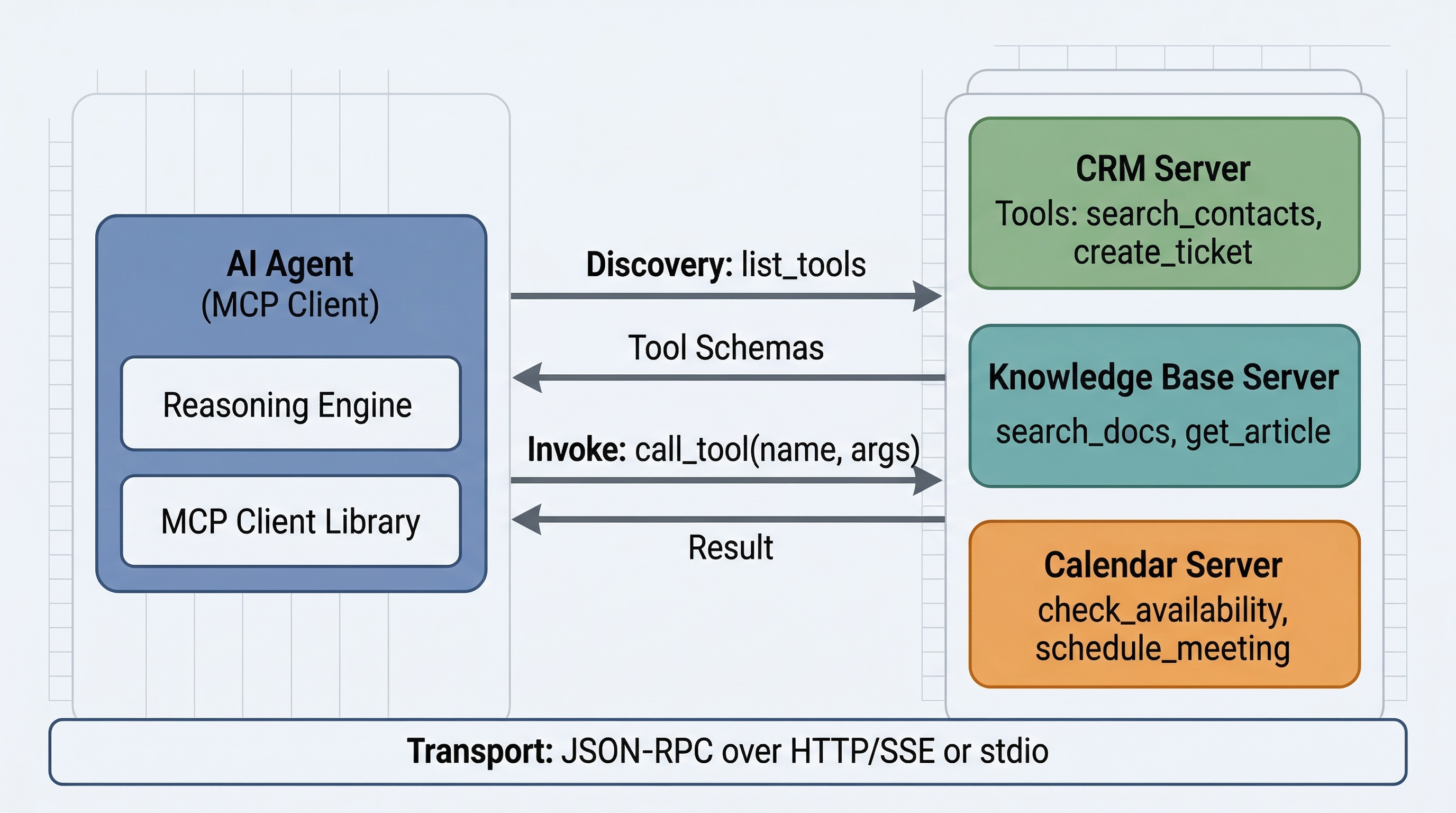
In the insurance company scenario, the architecture would look like this. The CRM team deploys an MCP server that wraps their REST API. This server exposes tools like lookup_policyholder, get_policy_details, and update_contact_info. The IT operations team deploys an MCP server that wraps their ticketing system, exposing tools like create_claim_ticket, get_claim_status, and assign_adjuster. The finance team deploys an MCP server that wraps their billing platform, exposing tools like get_premium_balance and record_payment.
Your claims processing agent connects to all three MCP servers. From the agent’s perspective, these tools look identical — same protocol, same message format, same invocation pattern. The agent does not know or care that one tool talks to a REST API and another talks to a GraphQL endpoint behind the scenes.
|
Think of MCP like a USB port for AI agents — plug in any tool server and the agent can discover and use its capabilities. Just as USB standardized how peripherals connect to computers, MCP standardizes how tools connect to agents. |
4.2.3 The Connection Lifecycle: Initialization, Discovery, Operation
An MCP connection follows a structured lifecycle with three phases: initialization, discovery, and operation.
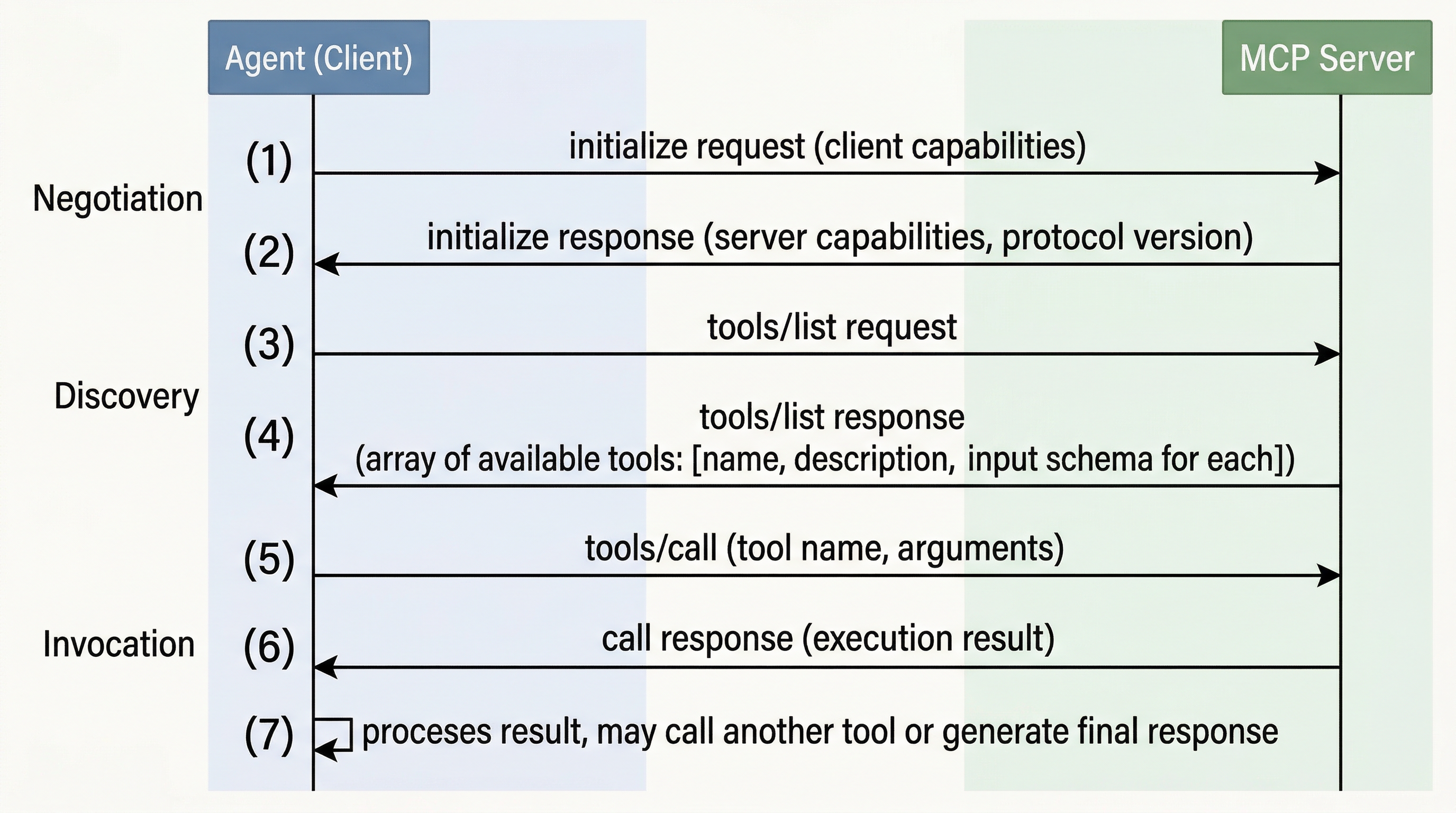
Phase 1: Initialization. The MCP client (your agent) establishes a connection to an MCP server. The client sends an initialize request that includes the client’s protocol version and capabilities. The server responds with its own protocol version and capabilities. This handshake ensures both sides agree on what protocol features they support — capability negotiation happens here, during the initialize exchange, not as a separate later step.
Phase 2: Discovery. After the initialize handshake completes, the client queries the server’s available tools. The most common query is tools/list, which returns a list of all tools the server exposes, including their names, descriptions, and parameter schemas. The client can also query for resources (data the server can provide) and prompts (templates the server offers). This phase is where dynamic tool discovery happens — the agent learns what tools are available at runtime rather than having them hardcoded at development time.
Phase 3: Operation. With the tool catalog in hand, the agent can invoke tools using tools/call requests. Each request specifies the tool name and arguments, and the server returns the result. The agent can make as many tool calls as needed during a session.
4.2.4 Dynamic Tool Discovery
Dynamic tool discovery is one of MCP’s most powerful features. In the Chapter 3 approach, your agent’s tool list was fixed at development time — you wrote the tool definitions in your code and deployed them. If a new tool became available, you had to update your code and redeploy.
With MCP, the agent discovers available tools at connection time by calling tools/list. This means that when the CRM team adds a new get_claims_history tool to their MCP server, your agent automatically discovers it the next time it connects. You do not need to change your agent code. The server’s tool list is the source of truth, and it is always current.
Dynamic discovery also enables the agent to adapt to different environments. A development MCP server might expose a limited set of tools with mock data, while a production MCP server exposes the full set with real data. The same agent code works in both environments because it discovers what is available rather than assuming a fixed tool set.
4.2.5 MCP Message Format and Transport
MCP uses JSON-RPC 2.0 as its message format. Every message — whether a request, response, or notification — follows the JSON-RPC specification with a method name, parameters, and an ID for correlating requests with responses.
Here is what a tools/list request and response look like:
// Request: Client asks the server what tools are available
{
  "jsonrpc": "2.0",
  "id": 1,
  "method": "tools/list"
}

// Response: Server returns its tool catalog
{
  "jsonrpc": "2.0",
  "id": 1,
  "result": {
    "tools": [
      {
        "name": "lookup_policyholder",
        "description": "Retrieves policyholder information by policy number or customer name. Returns contact details, policy type, coverage limits, and claim history summary.",
        "inputSchema": {
          "type": "object",
          "properties": {
            "policy_number": {
              "type": "string",
              "description": "The policy number, e.g., 'POL-2025-00421'."
            },
            "customer_name": {
              "type": "string",
              "description": "The customer's full name for fuzzy search."
            }
          },
          "required": []
        }
      },
      {
        "name": "get_claim_status",
        "description": "Returns the current status and history of a claim by claim ID.",
        "inputSchema": {
          "type": "object",
          "properties": {
            "claim_id": {
              "type": "string",
              "description": "The unique claim identifier."
            }
          },
          "required": ["claim_id"]
        }
      }
    ]
  }
}
And here is a tools/call request and response:
// Request: Client invokes the lookup_policyholder tool
{
  "jsonrpc": "2.0",
  "id": 2,
  "method": "tools/call",
  "params": {
    "name": "lookup_policyholder",
    "arguments": {
      "policy_number": "POL-2025-00421"
    }
  }
}

// Response: Server returns the tool result
{
  "jsonrpc": "2.0",
  "id": 2,
  "result": {
    "content": [
      {
        "type": "text",
        "text": "{\"customer_name\": \"Maria Santos\", \"policy_type\": \"Homeowner\", \"coverage_limit\": 500000, \"status\": \"Active\", \"claims_filed\": 2}"
      }
    ]
  }
}
MCP supports two transport mechanisms. The first is stdio (standard input/output), where the MCP server runs as a local subprocess and communicates through stdin and stdout pipes. This transport is ideal for development and local tool servers. The second is HTTP with Server-Sent Events (SSE), where the MCP server runs as a remote web service. The client sends requests via HTTP POST, and the server streams responses and notifications back through SSE. This transport is designed for production deployments where MCP servers run on separate infrastructure.
The choice of transport does not affect the message format — the JSON-RPC messages are identical regardless of whether they travel over stdio or HTTP. This separation of concerns means you can develop and test with stdio locally and deploy with HTTP/SSE in production without changing your tool invocation logic.
4.2.6 Security Considerations
MCP connections cross trust boundaries, and security must be addressed at multiple layers. Authentication verifies the identity of the client connecting to the MCP server. For HTTP/SSE transport, this typically uses OAuth 2.0 tokens or API keys sent in request headers. For stdio transport, the security boundary is the operating system process model — only processes that can launch the MCP server subprocess can communicate with it.
Authorization controls which tools a given client is allowed to call. An MCP server can restrict tool access based on the client’s identity — for example, allowing the claims agent to call lookup_policyholder but not delete_policy. This is typically implemented in the MCP server’s middleware layer.
Input validation is the server’s responsibility. The MCP server must validate all arguments received from clients before passing them to the underlying service. An agent might send unexpected parameter values — whether through model hallucination or adversarial prompting — and the server must handle these gracefully.
Transport encryption protects data in transit. HTTP/SSE connections should always use TLS. Stdio connections are inherently local and do not traverse the network, so transport encryption is not applicable.
|
Remote tools cross trust boundaries — validate all tool outputs before acting on them. A remote MCP server might return unexpected data formats, stale information, or even malicious content if it is compromised. Treat remote tool outputs with the same skepticism you would apply to any external API response. |
|
MCP is an open standard — the same server can be used by different agent frameworks. An MCP server you build for a Microsoft Foundry agent works equally well with agents built using other frameworks that support the MCP client protocol. This interoperability is one of the protocol’s key design goals. |
4.3 Connecting an Agent to MCP Server Tools
4.3.1 Registering an MCP Server with a Foundry Agent
Microsoft Foundry supports MCP as a tool connection method for agents. When you create an agent in Microsoft Foundry, you can register MCP servers alongside locally defined tools. The agent treats both kinds of tools uniformly — it discovers them, sees their schemas, and calls them using the same tool-call lifecycle you learned in Chapter 3.
To connect a Foundry agent to an MCP server, you provide the server’s endpoint URL and authentication details as part of the agent’s tool configuration. The agent then discovers the server’s tools at connection time and can call them as part of its reasoning loop.
# Illustrative pattern — connecting a Foundry agent to an MCP server.
from azure.ai.projects import AIProjectClient        (1)
from azure.identity import DefaultAzureCredential

project_client = AIProjectClient(
    credential=DefaultAzureCredential(),
    endpoint="https://your-project.services.ai.azure.com"
)

# Describe the MCP server the agent should connect to.
mcp_tool = {                                          (2)
    "type": "mcp",
    "server_label": "claims_ticketing",
    "server_url": "https://mcp.ticketing.internal.company.com/sse",
    "require_approval": "never"
}

# Create the agent with the MCP server registered as a tool source.
agent = project_client.agents.create_agent(          (3)
    model="gpt-4o",
    name="Claims Processing Assistant",
    instructions="You help claims adjusters process insurance claims. "
                 "Use the connected tools to look up claims and policies.",
    tools=[mcp_tool]
)| 1 | The Foundry project client authenticates to your Azure AI project. |
| 2 | The MCP server is described by a label, an endpoint URL, and an approval policy that governs whether tool calls require human confirmation. |
| 3 | When the agent runs, it connects to the MCP server, discovers the exposed tools via tools/list, and may call them during its reasoning loop. |
Once configured, the agent automatically discovers the tools exposed by the MCP server. When the agent’s reasoning loop determines that it needs to check a claim’s status, it issues a tools/call to the remote tool just as it would call a local function — but the execution happens on the remote MCP server.
|
The exact SDK symbols for registering MCP servers (class names, parameter shapes, the |
4.3.2 Handling Latency: MCP Tool Calls Cross the Network
MCP tool calls over HTTP/SSE introduce network latency that local tool calls do not have. A local tool executes in milliseconds. A remote MCP tool call involves an HTTP round trip, server-side processing, and a response — typically adding hundreds of milliseconds to seconds per call.
This latency matters for the agent’s reasoning loop. If the agent makes five sequential tool calls, each taking one second, the total wait time is five seconds before the agent can generate a response. Users notice this delay.
Three strategies help manage MCP tool latency. First, batch when possible — if the agent needs data from multiple tools on the same MCP server, some implementations support batch requests that reduce round trips. Second, set explicit timeouts — configure your agent to abandon tool calls that take too long rather than waiting indefinitely. Third, cache tool results where appropriate — if a policyholder’s information does not change during a single claims processing session, cache the first lookup result and reuse it.
4.3.3 Error Handling for MCP Tools
MCP tools introduce failure modes that local tools do not have. The MCP server might be unreachable due to a network partition. The server might return an error because the underlying service is down. The connection might time out. The server might return a valid MCP response that contains an error message from the backend system.
Your agent needs to handle all of these gracefully. At the transport level, implement retry logic with exponential backoff for transient network failures. At the protocol level, check the MCP response for error codes and messages. At the application level, instruct your agent through its system prompt on how to behave when tools fail — should it inform the user, try an alternative approach, or proceed with partial information?
import asyncio

async def safe_tool_call(session, tool_name, arguments, max_retries=3):
    """Call an MCP tool with retry logic and error handling."""
    for attempt in range(max_retries):
        try:
            result = await asyncio.wait_for(
                session.call_tool(tool_name, arguments=arguments),
                timeout=10.0  # 10-second timeout per attempt
            )
            return {"success": True, "data": result.content[0].text}
        except asyncio.TimeoutError:
            if attempt < max_retries - 1:
                await asyncio.sleep(2 ** attempt)  # Exponential backoff
                continue
            return {"success": False, "error": "Tool call timed out after retries"}
        except ConnectionError:
            return {"success": False, "error": f"Cannot reach MCP server for {tool_name}"}
        except Exception as e:
            return {"success": False, "error": f"Tool call failed: {str(e)}"}
4.3.4 When to Use MCP Servers vs. Local Tool Definitions
Not every tool should be reached through MCP. Use an MCP server when the tool wraps a service maintained by another team, when the tool’s implementation changes independently of your agent, or when the tool accesses data that must stay within a particular security boundary (the data never leaves the MCP server’s environment — only the result comes back to your agent).
Use local tool definitions, like the ones you wrote in Chapter 3, when you control the tool’s implementation, when low latency is critical, or when the tool is simple enough that the overhead of an MCP server is not justified. A tool that formats a date or calculates a percentage does not need its own MCP server.
In practice, most production agents use a mix of both. The claims processing agent might define local tools for text formatting and data validation while connecting to MCP servers for CRM access, ticket management, and billing operations.
4.4 Foundry IQ: A Managed Knowledge Layer for Agents
MCP gives your agent tools — the ability to act on external systems. But the claims processing agent also needs knowledge: it must answer questions grounded in the company’s policy language, regulatory guidelines, and precedent rulings. In Chapter 2, you built exactly this kind of grounding by hand: you chunked documents, generated embeddings, populated an Azure AI Search index, retrieved the top matching chunks at query time, and stuffed them into the prompt. That hand-built RAG pipeline taught you how grounding works, but it left you owning every moving part.
Foundry IQ (part of Microsoft Foundry, available through the 2026-04-01 REST API — confirm the current version for your environment) is a managed knowledge layer that an agent calls as a single, reasoning-driven knowledge source. Built on Azure AI Search, it takes over the retrieval machinery you assembled in Chapter 2 and adds a layer of reasoning on top of it.
4.4.1 Knowledge Bases and Knowledge Sources
The central abstraction in Foundry IQ is the knowledge base. A knowledge base aggregates one or more knowledge sources into a single retrieval target that an agent can query. A knowledge source is a connection to a place where your organization’s information lives. Foundry IQ supports several kinds of knowledge sources, including:
-
Azure Blob Storage — document archives, exported records, and unstructured files.
-
SharePoint — team sites, policy libraries, and collaboration spaces.
-
OneLake — data stored in the Microsoft Fabric lake.
-
Public web — curated public web content, such as a regulator’s public guidance portal.
For the insurance claims agent, a single knowledge base might aggregate three sources: a Blob Storage container holding the precedent-ruling archive, a SharePoint site holding current policy language, and a public web source pointing at the state regulator’s published guidelines. The agent does not query three separate systems with three different access patterns. It queries one knowledge base, and Foundry IQ fans the query out across the underlying sources.
4.4.2 Permission-Aware Retrieval
A knowledge base is permission-aware. Because the underlying sources — SharePoint, OneLake, and others — carry their own access control, Foundry IQ can honor those permissions at query time, so a user only receives results from documents they are actually allowed to see.
This matters enormously in the insurance scenario. A claims adjuster handling consumer policies should not retrieve precedent rulings sealed for legal review, and a contractor with limited access should not see internal compliance memos. With hand-built RAG, enforcing this is on you: you must propagate identity into every query and filter results yourself, which is error-prone and easy to get subtly wrong. Permission-aware retrieval pushes that enforcement down into the managed layer, so the knowledge base returns grounded answers that respect the requesting user’s access rights.
4.4.3 Agentic Retrieval
The feature that most distinguishes Foundry IQ from a classic RAG pipeline is agentic retrieval: Foundry IQ treats retrieval itself as a reasoning task rather than a single similarity lookup.
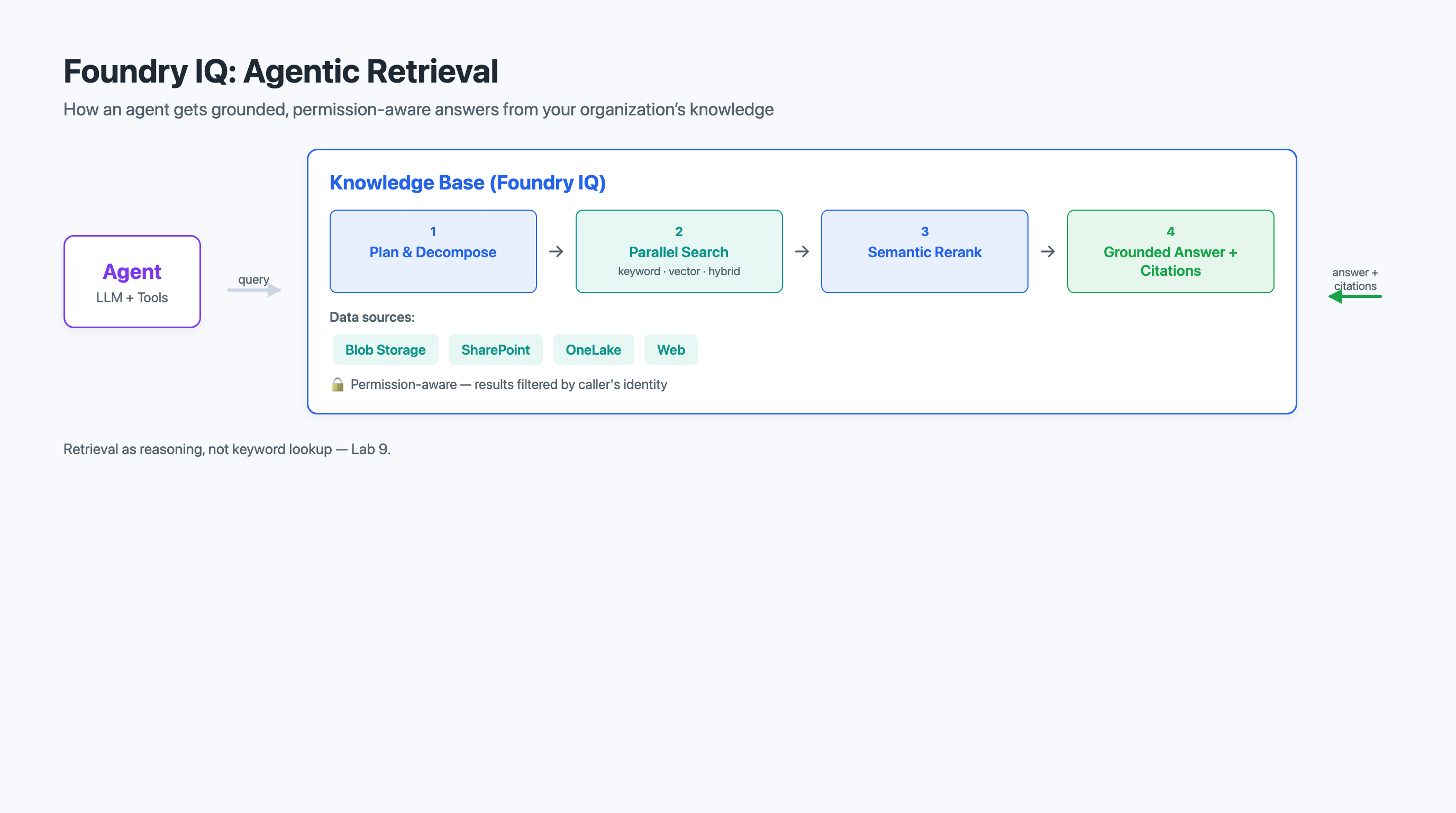
When the agent sends a question to the knowledge base, Foundry IQ does the following:
-
Plans and decomposes the query. A complex question is broken into focused subqueries. The question "Has our handling of the Santos water-damage claim followed both our homeowner policy language and the state’s 2025 disclosure rules?" decomposes into separate subqueries — one about homeowner policy language for water damage, one about the state’s 2025 disclosure rules, and one about the handling record for that specific claim.
-
Runs the subqueries in parallel. Each subquery is executed across the knowledge sources at once, using hybrid search — a combination of keyword (lexical) search and vector (semantic) search — so that both exact-term matches and conceptually similar passages are retrieved.
-
Applies semantic reranking. The candidate results from all subqueries are scored by a semantic reranker that orders passages by how well they actually answer the question, not merely how well their keywords or embeddings match. Low-relevance passages are dropped.
-
Returns grounded answers with citations. Foundry IQ returns synthesized, grounded content along with citations that point back to the specific source documents and passages. The agent can surface those citations to the user, so every claim is traceable to its source.
The phrase "agentic retrieval" is precise: the retrieval layer is itself doing a small amount of agent-like reasoning — planning, decomposing, searching, and reranking — before it ever hands results back to the calling agent. Your agent asks one question; Foundry IQ may run several searches to answer it well.
4.4.4 How Foundry IQ Differs from Hand-Built RAG (Chapter 2)
It is worth being explicit about how a Foundry IQ knowledge base differs from the RAG pipeline you built in Chapter 2, because they solve the same underlying problem — grounding an answer in your documents — in very different ways.
| Dimension | Hand-built RAG (Chapter 2) | Foundry IQ knowledge base |
|---|---|---|
Who owns the pipeline |
You: chunking, embedding, indexing, querying, and reranking are your code. |
Microsoft Foundry: the pipeline is a managed service you configure. |
Number of sources |
Typically one index you populate and maintain. |
Many sources (Blob, SharePoint, OneLake, web) aggregated into one knowledge base. |
Retrieval strategy |
A single similarity (or hybrid) lookup against your index per query. |
Reasoning-driven: query planning, decomposition into subqueries, parallel hybrid search, and semantic reranking. |
Query handling |
One user question maps to one retrieval call. |
One user question may fan out into several subqueries that are searched in parallel. |
Permissions |
You must propagate identity and filter results yourself. |
Permission-aware retrieval honors each source’s access control at query time. |
Citations |
You assemble citations from the chunks you retrieved. |
Grounded answers come back with citations to source passages. |
The agent’s view |
The agent prompts a model with chunks you fetched and injected. |
The agent calls the knowledge base as a single knowledge tool and receives grounded, cited results. |
The trade-off is the familiar one between control and convenience. Hand-built RAG gives you full visibility into and control over every retrieval step — which is why you learned it first in Chapter 2. Foundry IQ gives you a managed, multi-source, reasoning-driven retrieval layer that you attach to an agent rather than maintain yourself. For an enterprise with knowledge scattered across many systems and strict access rules, the managed layer usually wins.
4.4.5 Attaching a Knowledge Base to an Agent
From the agent’s perspective, a Foundry IQ knowledge base is a knowledge tool it can call. You create or reference a knowledge base (configured with its knowledge sources) and attach it to the agent. When the agent’s reasoning determines that it needs grounded information, it queries the knowledge base and incorporates the returned, cited content into its answer.
# Illustrative pattern — attaching a Foundry IQ knowledge base to an agent.
from azure.ai.projects import AIProjectClient        (1)
from azure.identity import DefaultAzureCredential

project_client = AIProjectClient(
    credential=DefaultAzureCredential(),
    endpoint="https://your-project.services.ai.azure.com"
)

# Reference a knowledge base that aggregates several knowledge sources
# (Blob Storage, SharePoint, public web) configured in the Foundry portal.
knowledge_tool = {                                    (2)
    "type": "knowledge_base",
    "knowledge_base_name": "claims-policy-knowledge"
}

# Create an agent that can ground its answers in the knowledge base.
agent = project_client.agents.create_agent(          (3)
    model="gpt-4o",
    name="Claims Knowledge Assistant",
    instructions="Answer policy and regulatory questions using the attached "
                 "knowledge base. Always cite the source passages you rely on.",
    tools=[knowledge_tool]
)| 1 | The Foundry project client authenticates to your Azure AI project. |
| 2 | The agent references a knowledge base by name; the knowledge sources and agentic-retrieval behavior are configured on the knowledge base itself. |
| 3 | At run time, the agent queries the knowledge base, which performs agentic retrieval and returns grounded, cited content for the agent to use. |
|
As with the MCP example, exact Foundry SDK symbols and the precise |
|
A good test of whether knowledge belongs in a Foundry IQ knowledge base versus an MCP tool: ask whether the agent needs to read and reason over documents (knowledge base) or take an action against a live system (MCP tool). Looking up policy language is knowledge; updating a claim’s status is an action. |
4.5 Hands-On Connections
This chapter’s concepts are applied directly in two lab activities. Here is what to focus on in each.
Lab 8: Develop an AI Agent with Model Context Protocol (MCP) Tools
In Lab 8, you will connect a Microsoft Foundry agent to an MCP server and have it discover and invoke the server’s tools. As you work through the lab, pay attention to the following:
-
Discovery. Observe the tool discovery process. When your agent connects to the MCP server, what tools does it find? How do the tool names and descriptions compare to what you would write manually?
-
Invocation. Call a tool through the MCP connection and examine the request and response. How does the JSON-RPC message format compare to the direct tool calling approach from Chapter 3?
-
Latency. Time your MCP tool calls and compare them to a local function call. How much latency does the network round trip add, and how does that affect the user experience?
-
Error handling. Deliberately disconnect the MCP server or send invalid parameters. How does your agent respond? Does it degrade gracefully or fail loudly?
Lab 9: Integrate an AI Agent with Foundry IQ
In Lab 9, you will attach a Foundry IQ knowledge base to an agent and observe agentic retrieval in action. Focus on:
-
Multiple sources. Configure a knowledge base that aggregates more than one knowledge source. Ask a question that can only be answered by combining information from two sources, and confirm the agent pulls from both.
-
Query decomposition. Pose a compound question and inspect how Foundry IQ decomposes it into subqueries. How does this differ from the single-lookup behavior of your Chapter 2 RAG pipeline?
-
Citations. Examine the citations returned with each grounded answer. Trace a citation back to its source passage and verify the answer is actually supported.
-
Contrast with Chapter 2. Compare the effort of attaching this managed knowledge base with the effort of building the RAG pipeline by hand in Chapter 2. What did you no longer have to build?
4.6 Assessment Preparation
This week’s assessment asks you to design the knowledge and tool layer for the insurance claims processing agent described in Section 4.1: a short design document (approximately 1,000-1,400 words) that specifies which capabilities the agent reaches through MCP and which knowledge it reaches through Foundry IQ, and justifies each choice. The document has four required sections. Here is guidance for approaching each one.
Tools via MCP
Identify which of the agent’s capabilities should be reached through MCP servers rather than local tool definitions. For each, name the owning team and the backend system, and explain why MCP is the right choice — using the criteria from Section 4.3.4 (another team owns it, it changes independently, or it must stay inside a security boundary). Do not route everything through MCP; call out at least one capability that is better as a local tool and say why.
Knowledge via Foundry IQ
Specify the knowledge base your agent will use and the knowledge sources it aggregates. For each source (Blob Storage, SharePoint, OneLake, or public web), explain what information it provides and why it belongs in the knowledge base. Address permission-aware retrieval explicitly: which users should see which sources, and how does the managed layer enforce that?
Agentic Retrieval and the Contrast with Hand-Built RAG
Choose one realistic compound question an adjuster might ask, and trace how agentic retrieval would handle it: how it decomposes into subqueries, which sources each subquery hits, how reranking selects the best passages, and what citations come back. Then contrast this with how you would have answered the same question using the Chapter 2 hand-built RAG pipeline. Be specific about what the managed layer does that your hand-built pipeline did not.
Failure and Trust Boundaries
Identify what can go wrong across both layers. For MCP: unreachable servers, timeouts, and untrusted tool output crossing a trust boundary. For Foundry IQ: a source that is stale, a permission misconfiguration, or an answer whose citations do not actually support it. For each failure mode, describe a specific mitigation. The assessment rewards thoroughness of thinking, not complexity — a simple, clearly explained mitigation beats a hand-waved complex one.
4.7 Key Terms
- Model Context Protocol (MCP)
-
An open standard protocol that defines how AI agents discover and interact with external tools through a uniform client-server interface, using JSON-RPC 2.0 messaging.
- MCP client
-
The agent-side component that connects to MCP servers, discovers available tools, and invokes them on behalf of the agent.
- MCP server
-
A service that wraps an external system’s capabilities behind the MCP protocol, exposing them as discoverable tools that any MCP-compatible agent can call.
- tool fragmentation
-
The problem of maintaining separate, custom integration code for each external service an agent needs to access, resulting in high maintenance costs and brittle connections.
- dynamic tool discovery
-
The capability of an agent to learn what tools are available at runtime by querying an MCP server, rather than having tools hardcoded at development time.
- JSON-RPC 2.0
-
The message format used by MCP for all communication between clients and servers, providing a standardized structure for requests, responses, and notifications.
- stdio transport
-
An MCP transport mechanism where the client and server communicate through the standard input and output streams of a local subprocess, used primarily for development and testing.
- HTTP/SSE transport
-
An MCP transport mechanism where the client sends requests via HTTP POST and the server streams responses through Server-Sent Events, designed for production remote deployments.
- capability negotiation
-
The exchange during the MCP
initializehandshake in which the client and server agree on protocol version and supported features. Tool discovery viatools/listfollows in the separate Discovery phase. - Foundry IQ
-
A managed knowledge layer in Microsoft Foundry, built on Azure AI Search, that an agent calls as a single, reasoning-driven knowledge source rather than hand-building a retrieval pipeline.
- knowledge base
-
In Foundry IQ, a retrieval target that aggregates one or more knowledge sources and serves grounded, cited answers to an agent through agentic retrieval.
- knowledge source
-
A connection to a place where an organization’s information lives — such as Azure Blob Storage, SharePoint, OneLake, or curated public web content — that can be aggregated into a Foundry IQ knowledge base.
- agentic retrieval
-
A retrieval approach that treats answering a query as a reasoning task — planning and decomposing the query into subqueries, running them in parallel with hybrid search, applying semantic reranking, and returning grounded answers with citations.
- permission-aware retrieval
-
Retrieval that honors the access controls of the underlying knowledge sources at query time, so a user only receives results from documents they are authorized to see.
- hybrid search
-
A search strategy that combines keyword (lexical) matching with vector (semantic) matching so that both exact-term and conceptually similar results are retrieved.
- semantic reranking
-
A step that reorders candidate retrieval results by how well they actually answer the question, rather than by raw keyword or embedding similarity.
- trust boundary
-
A point in a system architecture where data or control passes between components with different levels of trust, requiring validation and security checks at the crossing point.
4.8 Chapter Summary
This chapter gave your agents two things they did not build themselves: tools to act with and knowledge to reason over. You learned how the Model Context Protocol provides a uniform, open interface for agents to discover and call tools exposed by external services, eliminating the tool fragmentation problem that arises when many teams maintain many services. You walked through the MCP connection lifecycle — initialization (where capability negotiation occurs), discovery (where tools/list is called), and operation — and saw how JSON-RPC 2.0 messaging over stdio or HTTP/SSE transport supports both local development and remote production deployments. You then connected a Foundry agent to an MCP server, managed the latency and failure modes that come with crossing the network, and learned when a capability belongs in an MCP server versus a local tool definition.
You then turned from tools to knowledge with Foundry IQ, a managed knowledge layer built on Azure AI Search. You learned how a knowledge base aggregates multiple knowledge sources — Blob Storage, SharePoint, OneLake, and public web — behind a single query target, and how permission-aware retrieval honors each source’s access controls. You examined agentic retrieval, in which the retrieval layer plans and decomposes a query into subqueries, runs them in parallel with hybrid search, applies semantic reranking, and returns grounded answers with citations. Most importantly, you contrasted this managed, reasoning-driven layer with the hand-built RAG pipeline from Chapter 2, trading control for convenience when knowledge is spread across many systems with strict access rules.
In Chapter 5, Agent Frameworks & Multi-Agent Orchestration, you will move from connecting a single agent to its tools and knowledge toward building agents with higher-level frameworks and coordinating multiple specialized agents into a single system. The tools and knowledge layers you assembled here — MCP-connected actions and Foundry IQ knowledge — become the capabilities that those framework-built, multi-agent systems draw on.