Chapter 6: Text Analysis & Conversational Speech Agents
Learning Objectives
By the end of this chapter, you will be able to:
-
Extract entities, topics, summaries, and structured JSON from unstructured text using generative prompting and Foundry Tools.
-
Build a text-analysis agent that calls prompts and tools to process documents at scale.
-
Integrate speech-to-text and text-to-speech into an application and build a real-time, low-latency voice agent with the Voice Live API.
6.1 Introduction: From Text Analytics to Conversational Agents
In Chapter 5, you learned how to connect agents to external services through frameworks and orchestration patterns. Those agents are powerful orchestrators, but they depend on focused capabilities to perform domain-specific work. This chapter introduces two of those capabilities and — crucially — recasts them the way AI-103 now teaches them: not as a catalog of pre-built endpoints to call, but as generative prompting and agent modalities. Text analysis becomes something you do by prompting a language model for structured output and reaching for Foundry Tools when you need a deterministic service. Speech becomes a way for an agent to listen and talk.
Consider this scenario. A mid-sized law firm — Carter, Reeves & Associates — handles thousands of documents every week. Contracts arrive from corporate clients. Court filings come in from opposing counsel. Internal memoranda circulate between attorneys. Regulatory updates land from government agencies. Each document needs to be read, summarized, and have its key entities — party names, dates, monetary amounts, jurisdictions, case numbers — extracted and entered into the firm’s case management system. Associates spend hours searching through prior documents to answer questions about precedent, contract language, and regulatory requirements.
The firm’s managing partner wants to modernize this process. She envisions a system that can read an incoming document, extract its critical entities into a clean structured record, summarize it for rapid review, gauge the tone of client correspondence, and translate foreign-language filings — all without a human keying data by hand. She also wants attorneys to dictate notes and have them transcribed automatically, to have summaries read aloud during hands-free review, and — most ambitiously — to talk to a voice assistant that can answer plain-language questions about the firm’s matters in real time.
A few years ago, this scenario would have required wiring together half a dozen specialized endpoints. Today, most of it is a prompting problem. A capable language model, given the right instructions and an output schema, will extract entities, summarize, classify tone, and emit structured JSON in a single call — and it will reach out to Foundry Tools (such as Azure Translator or a dedicated language-analysis tool) when a deterministic, audited result is required. Wrap that prompting in an agent and you have a text-analysis agent. Give that agent ears and a voice and you have a conversational speech agent.
This chapter walks through each capability, then composes them into a generative text pipeline and a voice-native agent. Here is the roadmap:
-
Section 6.2 covers text analysis as generative prompting: extracting entities, topics, summaries, and structured JSON, detecting sentiment and tone, and translating with Foundry Tools.
-
Section 6.3 builds a text-analysis agent that calls those prompts and tools to process documents end to end.
-
Section 6.4 introduces speech-capable generative models — models that accept and produce audio directly.
-
Section 6.5 covers the speech fundamentals: speech-to-text, text-to-speech, and SSML.
-
Section 6.6 puts speech inside an agent and builds a real-time Voice Live voice agent.
-
Section 6.7 composes everything into a generative/agent text pipeline with error containment and human review.
-
Sections 6.8 and 6.9 connect the chapter to your hands-on labs and the written assessment.
This is the heaviest lab week in the course — six labs, Labs 12 through 17.
6.2 Text Analysis with Generative Prompting and Foundry Tools
The older way to analyze text was to call a separate pre-built endpoint for each task: one for sentiment, one for key phrases, one for named entities. AI-103 takes a different posture. The primary tool for text analysis is now a generative language model, prompted to return exactly the information you need — often as structured JSON you can drop straight into a database. You still lean on Foundry Tools for jobs that demand a deterministic, governed service (translation is the canonical example), but the default move is to write a good prompt.
For Carter, Reeves & Associates, this shift is liberating. Instead of stitching together NER, key-phrase, and sentiment calls and then reconciling their outputs, an associate can describe the record they want — parties, dates, amounts, jurisdiction, a two-sentence summary, and a tone label — and get it back in one shot.
6.2.1 Structured Extraction: Entities, Topics, and Summaries
Structured extraction is the practice of prompting a model to return information in a fixed, machine-readable shape rather than as free-form prose. You define a schema — the fields you want and their types — and instruct the model to populate it. Modern models support a structured output or JSON mode that constrains the response to valid JSON conforming to your schema, so downstream code never has to parse loosely formatted text.
This subsumes several of the classic text-analytics tasks:
-
Entity extraction replaces named entity recognition (NER). Instead of asking a fixed model for Person/Organization/Location/DateTime categories, you ask for exactly the entities your domain cares about — party names, case numbers, statutory references, monetary amounts — and define them as fields in your schema. The conceptual idea of NER (identifying entities and classifying them by type) is unchanged; the method is now a prompt.
-
Topic and key-phrase identification replaces key phrase extraction. You ask the model for the main concepts in the document, and it returns them as a list — with the added benefit that you can ask it to normalize, deduplicate, or group them by theme.
-
Summarization asks the model for a concise summary of a specified length and focus. Legal summarization in particular benefits from prompt engineering that specifies structure ("issue, holding, key dates"), length, and audience.
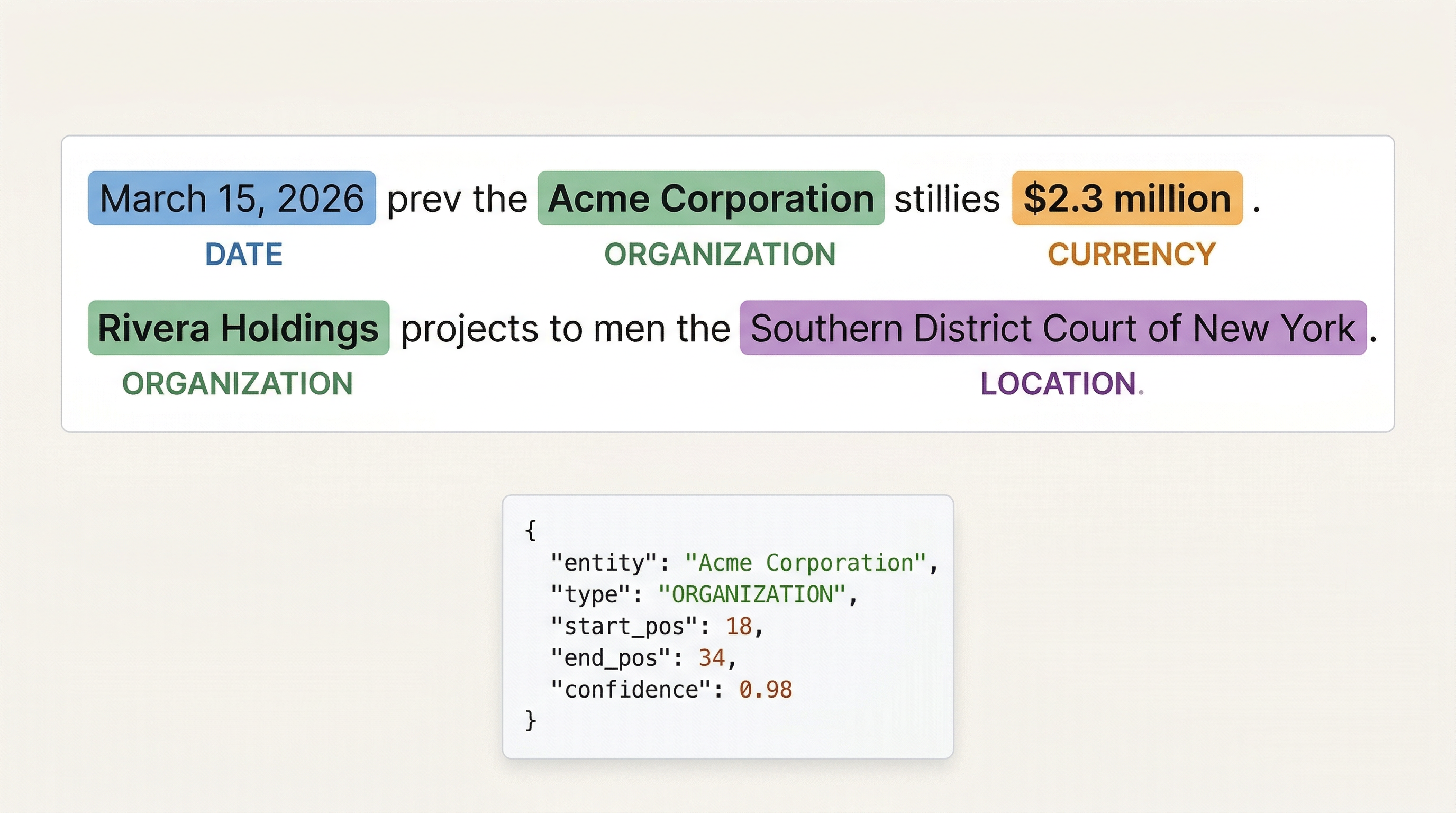
For the law firm, structured extraction is the backbone of automated intake. When a new contract arrives, a single prompt returns the parties, effective date, purchase price, jurisdiction, and any compliance flags as a JSON object whose fields map directly onto the case-management schema — eliminating the manual data entry that currently consumes paralegal time.
6.2.2 Sentiment, Tone, Safety, and Sensitive Content
The same model that extracts entities can judge sentiment and tone. Ask it to classify a client email as positive, negative, neutral, or mixed, and to characterize tone (frustrated, urgent, conciliatory) in a sentence. For the firm, this flags an angry email about a contract dispute for priority response and lets the firm aggregate sentiment across closed-case surveys without reading every response by hand.
Generative analysis goes further than the old sentiment endpoint. You can prompt for safety and sensitive-content signals — whether a message contains a threat, discloses privileged information, or names a sensitive party who should trigger a conflict check. These are domain judgments a fixed sentiment model could never make, but a well-prompted model with the firm’s policy in context handles them naturally. (For the platform-level guardrails that complement this prompt-level screening, recall the content-safety material in Chapter 2.)
6.2.3 Translation: Foundry Tools vs. LLM-Powered Translation
When a foreign-language filing arrives, you have two paths, and AI-103 expects you to know both.
Azure Translator, exposed as a Foundry Tool, is a dedicated, deterministic translation service. It supports a large catalog of languages, returns consistent results, can be governed and audited, and is the right choice when translation quality and reproducibility matter — a translated contract clause that will be relied upon in a filing should come from a service the firm can stand behind.
LLM-powered translation simply asks the generative model to translate. This is convenient — it happens inline with the rest of your prompting, requires no separate call, and can preserve formatting or follow special instructions ("keep legal terms in Latin untranslated"). The trade-off is less reproducibility and weaker coverage of rare languages.
The decision framework: reach for the Translator Foundry Tool when you need governed, consistent, high-coverage translation; use LLM-powered translation for quick, inline, lightly-formatted text where a small amount of variability is acceptable. A common pattern is to detect the language with the model, then route to the Translator tool only when the document is high-stakes.
|
Foundry Tools are the deterministic counterpart to free-form prompting. When an auditor, a regulator, or opposing counsel might question how a result was produced, prefer a Foundry Tool (Translator, a language-analysis tool) over an unconstrained prompt — you gain reproducibility and a clear provenance trail. Use raw prompting where speed and flexibility matter more than audit. |
6.2.4 Customizing Outputs for Domain Tasks
The real advantage of generative-first text analysis is customization without training. A pre-built classifier had to be trained on labeled data before it understood your categories. A generative model needs only a good prompt: describe the firm’s practice areas in the system instructions, give one or two examples, and ask it to tag each document. You can change the categories tomorrow by editing a sentence — no retraining, no labeled corpus, no deployment cycle.
This same flexibility applies to extraction schemas (add a field and the model populates it), summaries (change the focus by changing the instruction), and tone analysis (define the labels that matter to your business). The skill you are building is prompt design for structured output, not data labeling.
6.2.5 A Structured-Extraction Example
The following example demonstrates the generative-first approach: a single prompt that extracts entities, a summary, key topics, and a sentiment label, and returns them as structured JSON validated against a schema. This is the pattern you will use throughout the chapter and in Lab 12.
|
The code below uses the Azure OpenAI client with a JSON-schema-constrained response. SDK names and the exact structured-output API surface evolve; treat this as illustrative of the pattern (system instruction + schema + parse), not as a verbatim, copy-paste contract. Confirm the current method names against the Foundry/Azure OpenAI SDK docs before relying on them. |
import os
import json
from openai import AzureOpenAI

# Authenticate with your Azure OpenAI / Foundry deployment
client = AzureOpenAI(
    azure_endpoint=os.environ["AZURE_OPENAI_ENDPOINT"],
    api_key=os.environ["AZURE_OPENAI_KEY"],
    api_version="2024-10-21",
)

# The structured shape we want back -- maps onto the case-management schema
schema = {
    "type": "object",
    "properties": {
        "parties": {"type": "array", "items": {"type": "string"}},
        "effective_date": {"type": "string"},
        "monetary_amounts": {"type": "array", "items": {"type": "string"}},
        "jurisdiction": {"type": "string"},
        "statutory_references": {"type": "array", "items": {"type": "string"}},
        "summary": {"type": "string"},
        "key_topics": {"type": "array", "items": {"type": "string"}},
        "sentiment": {"type": "string",
                      "enum": ["positive", "negative", "neutral", "mixed"]},
    },
    "required": ["parties", "summary", "sentiment"],
}

document = """Carter, Reeves & Associates has reviewed the Meridian Technologies
acquisition agreement dated January 15, 2026. The purchase price of
$4.2 million is contingent upon completion of environmental due
diligence for the Davidson County facility. We have identified
potential Section 409A compliance concerns regarding the deferred
compensation provisions in Article VII."""

response = client.chat.completions.create(
    model="gpt-4o",  # your deployment name
    messages=[
        {"role": "system", "content": (
            "You are a legal document analyst. Extract the requested fields "
            "exactly. Use entity types relevant to legal practice. "
            "Return only valid JSON that matches the provided schema.")},
        {"role": "user", "content": document},
    ],
    response_format={  (1)
        "type": "json_schema",
        "json_schema": {"name": "legal_record", "schema": schema, "strict": True},
    },
)

record = json.loads(response.choices[0].message.content)  (2)
print(json.dumps(record, indent=2))| 1 | The response_format constrains the model to emit JSON conforming to our schema — this is structured output in action. No fragile prose parsing required. |
| 2 | Because the response is guaranteed valid JSON, a single json.loads yields a record ready to insert into the case-management system. |
This one call does the work that previously required separate sentiment, key-phrase, and entity endpoints — and the result is already shaped for the database. For high-stakes translation of a foreign-language filing, you would add a step that routes the text through the Azure Translator Foundry Tool before extraction, rather than asking the model to translate inline.
6.3 Building a Text-Analysis Agent
A single prompt analyzes one document. A text-analysis agent analyzes a stream of them — deciding which prompts and tools to apply, looping over a batch, handling errors, and producing a consistent structured record for each. Where Section 6.2 gave you the building block (a prompt that returns structured JSON), this section turns that block into an autonomous worker. This is Lab 13.
6.3.1 What Makes It an Agent
Recall from earlier chapters that an agent is a language model equipped with instructions, tools, and the autonomy to decide which tools to call. A text-analysis agent is an agent whose job is text analysis. Its system instructions describe the firm’s domain (practice areas, the fields to extract, the tone labels that matter). Its tools include the structured-extraction prompt from Section 6.2, the Azure Translator Foundry Tool, and perhaps a language-analysis Foundry Tool for tasks where a deterministic service is required. Given a document, the agent decides: Is this English? If not, call Translator. Does it look like a contract or correspondence? Apply the appropriate extraction schema. Are there safety or conflict flags? Surface them.
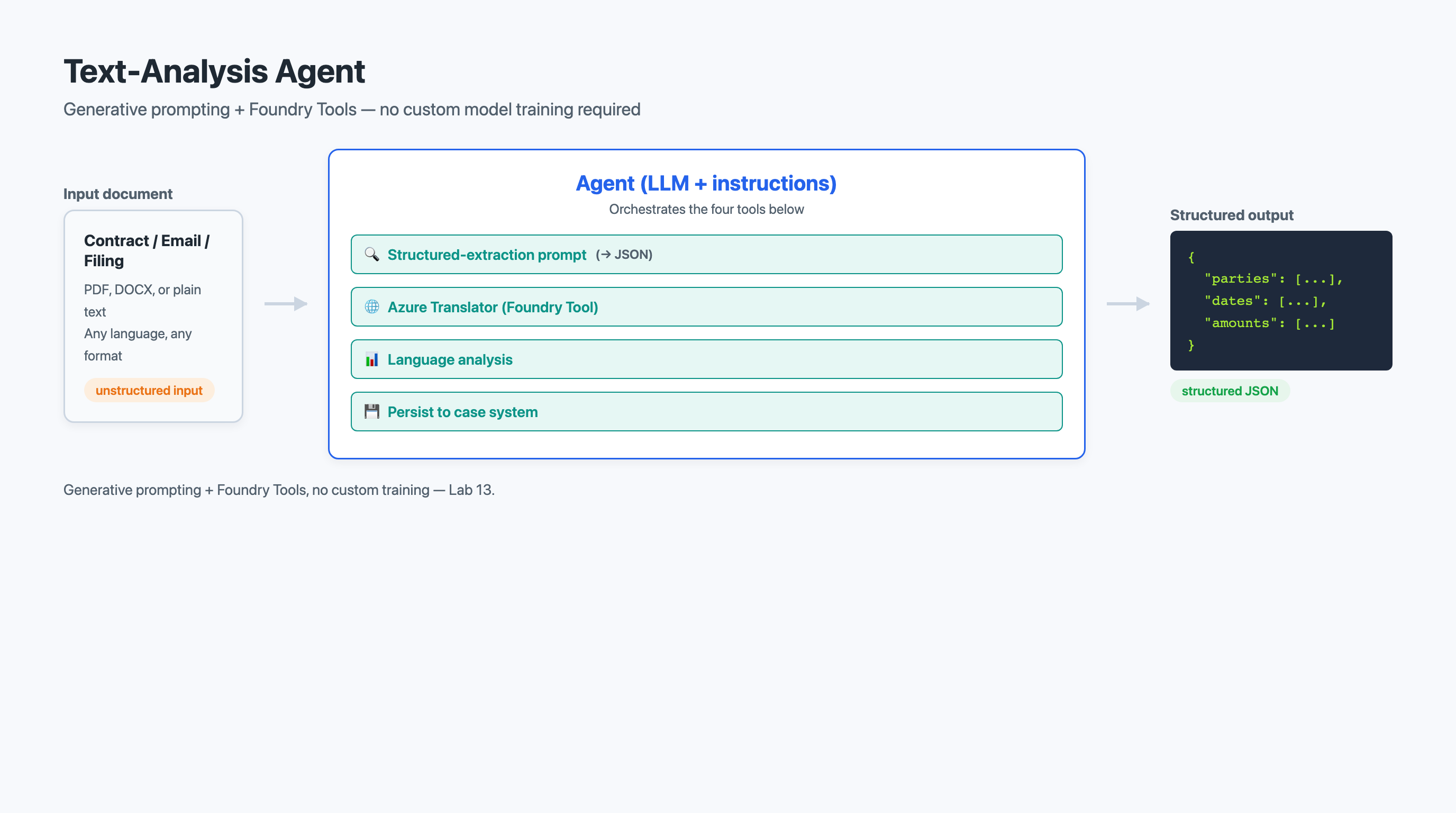
The agent framing matters because it moves the routing logic out of your application code and into the agent’s reasoning. You no longer write if language != "en": translate() — you tell the agent it has a Translator tool and let it decide when to use it. This is the same compositional thinking from Chapter 4 and Chapter 5, now applied to text analysis.
6.3.2 Tools the Agent Calls
A text-analysis agent typically has access to:
-
A structured-extraction capability — the schema-constrained prompt from Section 6.2, possibly several, one per document type.
-
The Azure Translator Foundry Tool — for governed translation of high-stakes foreign-language text.
-
A language-analysis Foundry Tool — for deterministic tasks (such as PII detection) where an auditable service is preferable to a prompt.
-
A persistence tool — to write the resulting record into the case-management system, closing the loop.
The agent’s value is in orchestration: choosing the right tool for each document, handling the cases where one tool’s output feeds another (detect language, then translate, then extract), and producing a uniform record regardless of the input’s format or language.
6.3.3 Why an Agent Instead of a Script
You could hard-code this routing in a Python script. The agent earns its place when the routing is non-trivial and evolving. New document types appear; the firm adds a practice area; a regulator requires a new field. With a script, each change is a code edit and a deploy. With an agent, many changes are an instruction edit. The agent also degrades more gracefully: faced with an unexpected document, a script throws an exception, while a well-instructed agent extracts what it can and flags the rest — the human-in-the-loop behavior you will revisit in Section 6.7.
|
An agent’s autonomy is a double-edged sword. Give it a persistence tool that writes to your database, and a misbehaving prompt can write wrong records at scale. Always gate write-capable tools behind confidence checks and, for high-impact fields, human review. An agent that confidently records the wrong effective date on a hundred contracts is worse than no automation at all. |
6.4 Speech-Capable Generative AI Models
Speech used to be a separate service you bolted onto a text model: transcribe audio to text, send the text to the model, synthesize the model’s text reply back to audio. AI-103 introduces a more direct path — speech-capable generative models that accept audio as input and produce audio as output natively, without a separate transcription and synthesis hop. This is Lab 14.
6.4.1 Audio In, Audio Out, Natively
A speech-capable model is a generative model with audio modality. You can hand it an audio clip and ask a question about it, and it reasons over the audio directly — including paralinguistic cues like tone, hesitation, and emphasis that a plain transcript discards. It can likewise respond with synthesized speech that carries appropriate intonation. Because the model never round-trips through text, it preserves nuance and cuts latency.
For Carter, Reeves & Associates, a speech-capable model can listen to a dictated case note and not only transcribe it but understand it — pulling out action items, flagging an urgent tone, and asking a clarifying question aloud if the dictation is ambiguous. That is qualitatively different from a transcription service that returns words and stops.
6.4.2 When to Use a Speech-Capable Model vs. Discrete STT/TTS
The native, audio-in/audio-out model is the right choice for conversational, low-latency, nuance-sensitive interactions — a back-and-forth voice assistant where tone and timing matter. Discrete speech-to-text and text-to-speech (Section 6.5) remain the right choice when you need fine-grained control or artifacts: a verbatim transcript with word-level timestamps for a deposition record, or precisely SSML-tuned synthesis for a published audio summary. Many systems use both — a speech-capable model for the live conversation, discrete STT to archive an accurate transcript of what was said.
6.5 Recognizing and Synthesizing Speech
Even with speech-capable models available, the discrete speech-to-text and text-to-speech services remain essential — for transcripts, for fine control over synthesized output, and as the building blocks inside an agent (Section 6.6). This section covers those fundamentals. This is Lab 15.
6.5.1 Speech-to-Text
Speech-to-text (STT) converts spoken audio into written text. The service accepts audio from microphones, files, or streams and returns transcribed text with punctuation, capitalization, and timing.
It supports two recognition modes. Continuous recognition processes long-form audio — meeting recordings, dictations, depositions — producing a full transcript. Single-shot recognition processes a short utterance, designed for interactive applications where the user speaks a query and waits.
Transcription results carry more than words. Word-level timestamps map each word to its position in the audio, enabling text-audio synchronization. Confidence scores flag portions where the model was uncertain. And speaker diarization labels which segments belong to which participant in a multi-speaker conversation.
6.5.2 Text-to-Speech and SSML
Text-to-speech (TTS) converts written text into spoken audio. Neural voices produce remarkably natural speech with appropriate pauses, intonation, and emphasis.
You control the output through Speech Synthesis Markup Language (SSML), an XML-based language specifying voice, speaking rate, pitch, volume, emphasis, pauses, and pronunciation. SSML matters for legal content, where correct pronunciation of proper nouns, Latin terms, and statutory references is essential. You can add phonetic spellings for unusual words, insert pauses between sections, and slow the rate for complex passages. The service offers hundreds of neural voices across 140-plus locales.
6.5.3 Real-Time vs. Batch, and Accuracy
Speech services run in two modes. Real-time processing transcribes audio as it is produced — essential for voice-driven interaction, where latency is critical. Batch processing handles pre-recorded files, optimized for throughput over latency — ideal for transcribing archived depositions in parallel and more cost-effective at volume.
Speech-to-text accuracy depends on audio quality (clear, close-range recordings beat noisy, distant ones), accents and dialects, and domain vocabulary. Legal terms like "voir dire," "certiorari," and "estoppel" challenge a general model.
|
Speech-to-text accuracy improves significantly with custom speech models trained on domain vocabulary, and with phrase lists that bias recognition toward known terms. Providing a list of the firm’s recurring proper nouns, statutes, and Latin phrases — optionally with sample audio and transcripts — yields far better recognition of legal terminology than the base model. |
The following example demonstrates a basic single-shot speech-to-text call with the Azure AI Speech SDK — the building block for the speech input of an agent.
import os
import azure.cognitiveservices.speech as speechsdk

# Configure the speech service
speech_config = speechsdk.SpeechConfig(
    subscription=os.environ["AZURE_SPEECH_KEY"],
    region=os.environ["AZURE_SPEECH_REGION"],
)
speech_config.speech_recognition_language = "en-US"  (1)

# Audio input: a file here; use_default_microphone=True for live mic
audio_config = speechsdk.audio.AudioConfig(filename="deposition_recording.wav")

speech_recognizer = speechsdk.SpeechRecognizer(
    speech_config=speech_config, audio_config=audio_config
)

result = speech_recognizer.recognize_once()  (2)

if result.reason == speechsdk.ResultReason.RecognizedSpeech:
    print(f"Recognized: {result.text}")
elif result.reason == speechsdk.ResultReason.NoMatch:
    print("No speech could be recognized in the audio.")
elif result.reason == speechsdk.ResultReason.Canceled:
    cancellation = result.cancellation_details
    print(f"Recognition canceled: {cancellation.reason}")
    if cancellation.reason == speechsdk.CancellationReason.Error:
print(f"Error details: {cancellation.error_details}")| 1 | The locale (en-US) selects the acoustic model for recognition; for multilingual input you can enable automatic language detection. |
| 2 | Single-shot recognition suits short utterances. In a live agent you would use continuous recognition with event handlers, feeding each recognized utterance into the agent. |
6.6 Speech in an Agent and the Voice Live Agent
The most compelling use of speech is giving an agent a voice — an assistant the user talks to and that talks back, processing each turn through the agent’s reasoning and tools. This section covers two levels: bolting STT/TTS onto an agent (Section 6.6.1, Lab 16), and the purpose-built, low-latency Voice Live path for true conversational voice agents (Section 6.6.2, Lab 17).
6.6.1 Azure Speech in an Agent
The straightforward way to give an agent a voice is to wrap it in a speech loop: speech-to-text on the way in, text-to-speech on the way out. This is Lab 16.
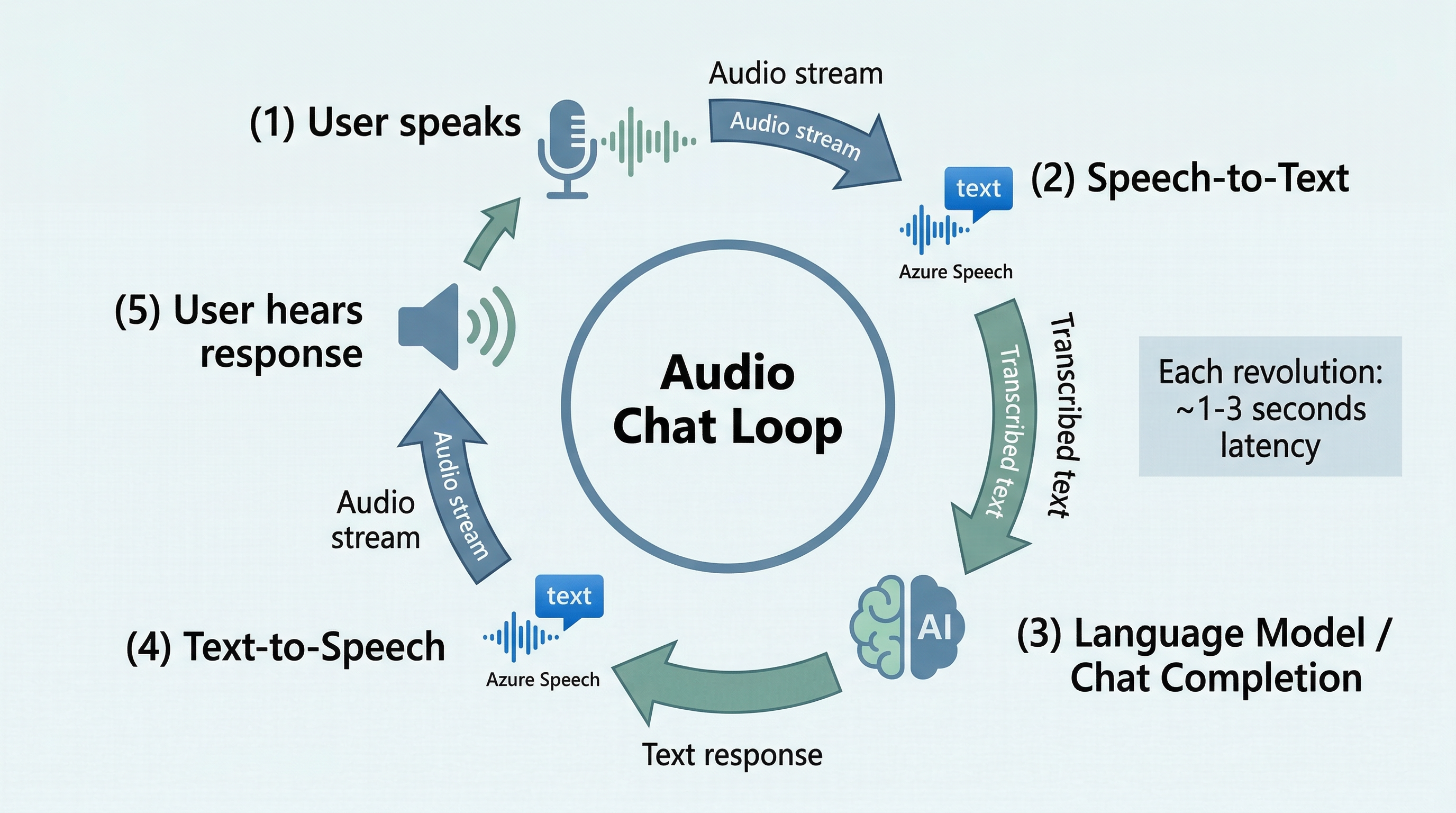
The loop: the user speaks; STT transcribes the utterance; the text goes to the agent, which reasons over it and may call tools (for the law firm, the text-analysis agent’s tools, or a matter-lookup tool); the agent returns a text answer; TTS synthesizes it; the audio plays; the user responds. Each step adds latency, and the total round-trip — from the user finishing their question to hearing the first word back — must feel conversational. Streaming synthesis (TTS begins before the full answer is generated) and partial recognition (STT emits interim results before the user stops speaking) help, but this stitched-together loop has an inherent ceiling on responsiveness, because each stage waits for the previous one to finish.
That ceiling is exactly the problem the Voice Live API solves.
6.6.2 The Voice Live Agent
The Voice Live API (part of Foundry Tools / Azure Speech) is a unified, low-latency speech-to-speech path purpose-built for voice agents. Instead of three discrete stages with their own round trips, Voice Live provides a single WebSocket-based streaming connection that handles listening, reasoning, and speaking as one continuous, overlapping flow. It is compatible with the Azure OpenAI Realtime API, so the programming model will feel familiar if you have used Realtime. This is Lab 17.
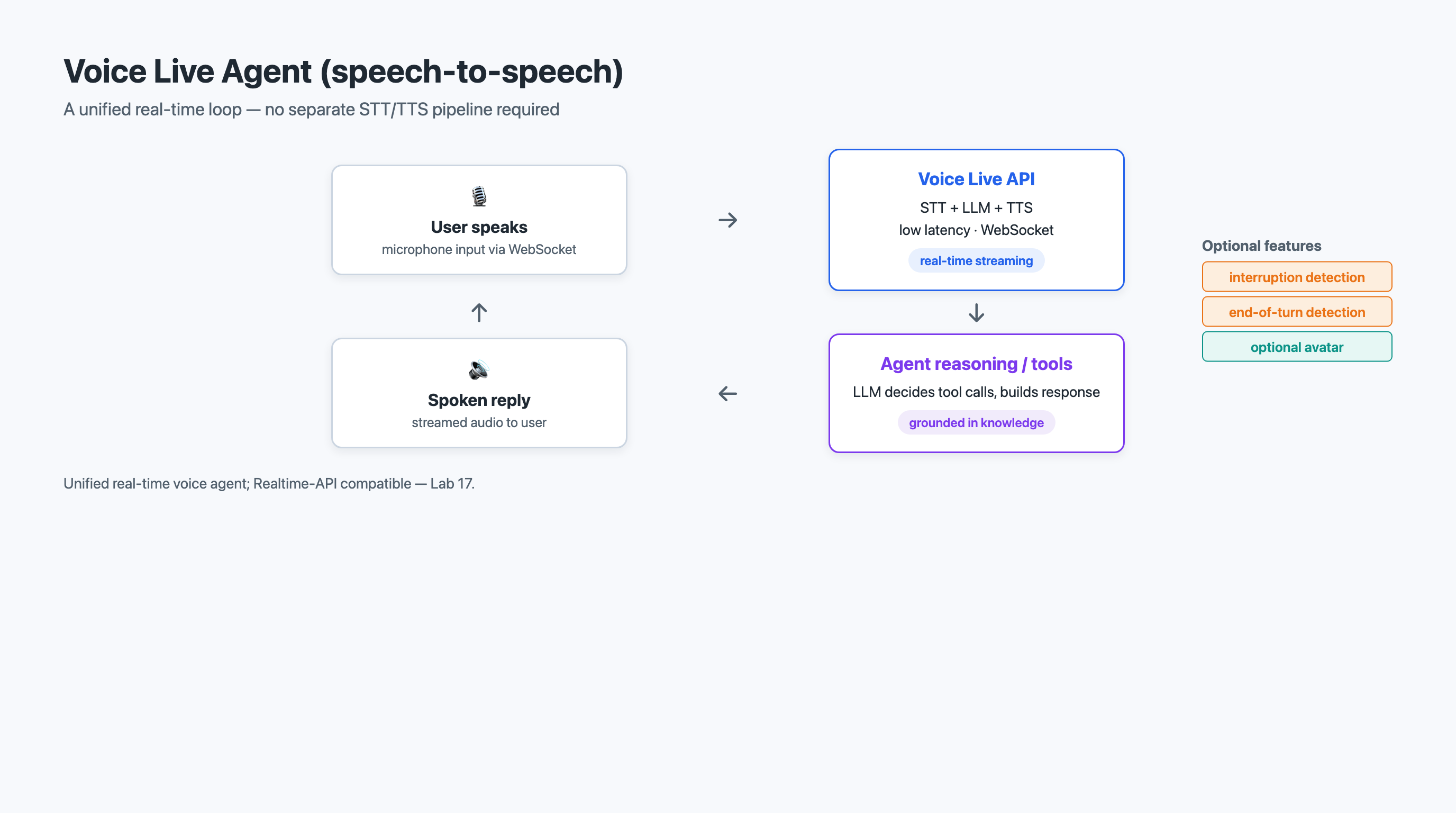
Voice Live brings several conversational capabilities that the stitched loop cannot easily match:
-
Noise suppression cleans the incoming audio so the agent hears the speaker, not the room.
-
Robust interruption detection lets the user cut in while the agent is talking — the agent stops and listens, the way a human would, instead of plowing through its scripted reply.
-
End-of-turn detection determines when the speaker has actually finished, rather than pausing mid-thought, so the agent responds at the right moment instead of talking over the user or leaving awkward silences.
-
Optional avatars render a synchronized talking face for interfaces that want a visual presence.
-
MCP server support lets the voice agent reach external tools and data through the same Model Context Protocol you saw in Chapter 5.
-
Broad coverage — 140-plus STT locales and 600-plus voices — for multilingual deployments.
Voice Live integrates with the Foundry Agent Service, so the same agent you defined for text (Section 6.3) can be given a voice-native front end: its instructions, tools, and MCP connections carry over, and Voice Live supplies the real-time audio modality on top.
For Carter, Reeves & Associates, this is the assistant the managing partner asked for: an attorney says, "What’s the termination clause in the Meridian Technologies contract?" — the agent, hearing them out (end-of-turn detection), reaches into the matter via an MCP tool, and answers aloud in under a second; the attorney interrupts mid-answer to ask a follow-up (interruption detection), and the conversation flows like a phone call.
|
Voice Live is a streaming, WebSocket-based, speech-to-speech API; production code manages a persistent connection and a stream of audio and control events rather than a single request/response call. The conceptual model here — one connection, overlapping listen/think/speak, interruption and end-of-turn detection handled by the service — is accurate; the precise event names and SDK surface are evolving, so verify against current Voice Live / Realtime documentation before building. Treat any specific method names as illustrative. |
6.7 Composing a Generative Text Pipeline
The capabilities in this chapter are building blocks. Their power emerges when you connect them into a pipeline where each stage performs its task and passes results to the next. This section teaches you to think in pipelines — now built from prompts and agents rather than a rack of discrete endpoints.
6.7.1 Pipeline Thinking: Output Feeds Input
A pipeline is a sequence of stages where the output of one becomes the input of the next. In a generative text pipeline, raw text (or audio) enters one end, and structured records, summaries, answers, or synthesized speech exit the other. For each stage you define three things: what it receives, what processing it performs, and what it produces. The output of one stage must be compatible with the input of the next — if your extraction stage emits a date string but the persistence stage expects ISO-8601, you need a normalization step between them.
This is the same compositional thinking you applied to agent tool chains in Chapter 4. The difference now is that the heavy stages are prompts and agents, not separately trained models — which makes the pipeline easier to change but means a single prompt’s behavior can shift the whole system’s output.
6.7.2 A Reference Pipeline: Intake to Searchable Record
A complete pipeline for the law firm, from intake to a searchable record, has four stages.
Stage 1: Document Intake. Documents arrive as PDF, Word, scanned images, or email attachments. The intake stage normalizes them into plain text — text extraction for digital files, Optical Character Recognition (OCR) via Azure AI Document Intelligence for scans (see Chapter 8), body-and-attachment extraction for email. Output: clean plain text plus metadata (source, receipt date, file type).
Stage 2: Language Handling. The text-analysis agent (Section 6.3) detects the language. English text proceeds directly; high-stakes foreign-language text is routed through the Azure Translator Foundry Tool. Output: English text plus the detected source language.
Stage 3: Structured Extraction and Analysis. A schema-constrained prompt (Section 6.2) extracts entities, a summary, key topics, a sentiment/tone label, and any safety or conflict flags — as structured JSON. Output: the original text plus a structured record.
Stage 4: Persistence and Indexing. The structured record is written into the case-management system and indexed for natural-language search, tagged with metadata from earlier stages (practice area, client, document type, date). Attorneys — or the Voice Live agent from Section 6.6 — can then query it. Output: a searchable, structured record.
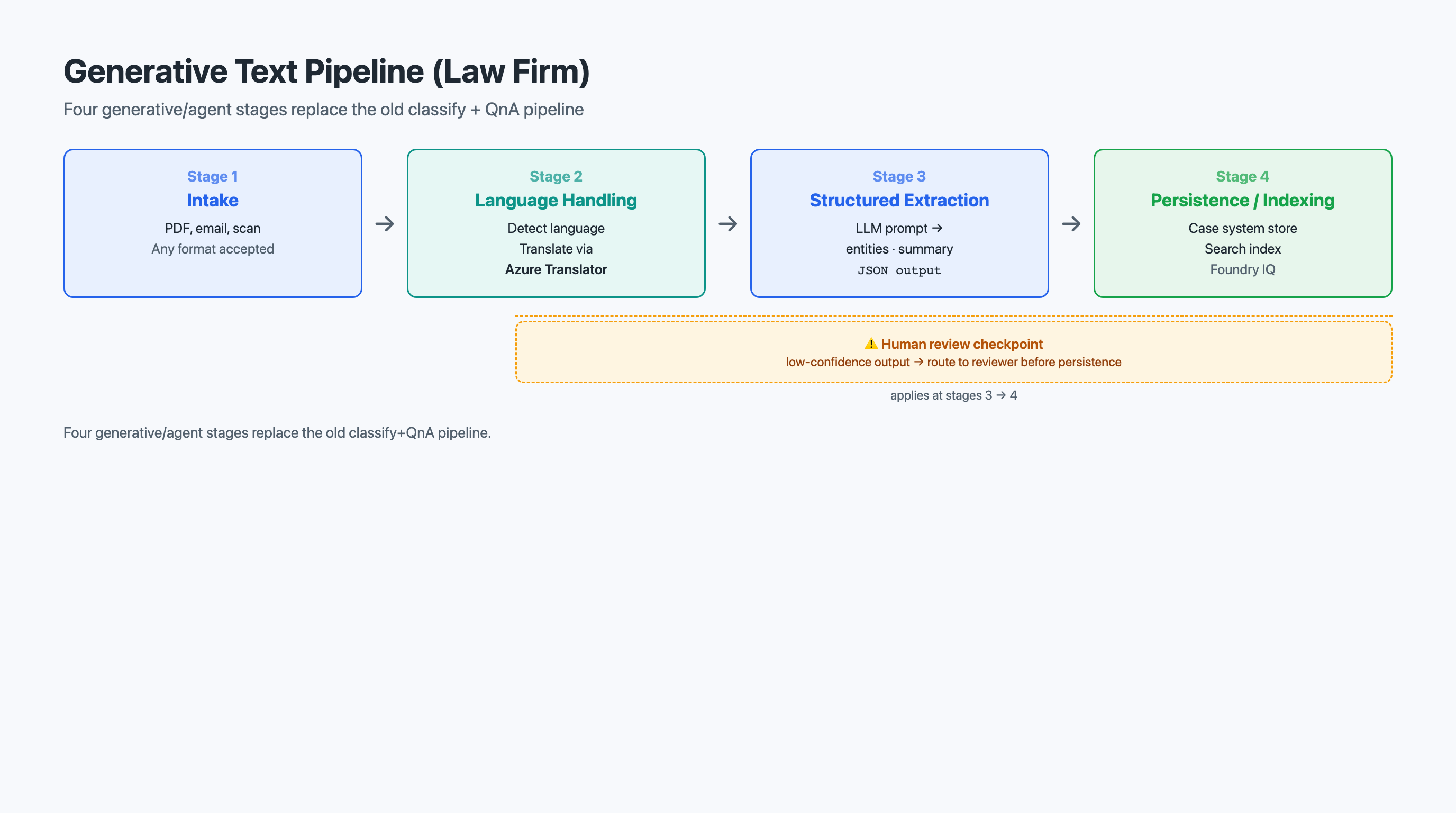
Notice what is gone compared to the older design: there is no separate custom-classification stage (classification is now a field the extraction prompt fills in) and no QnA-knowledge-base stage (search and Q&A are served by the indexed structured records and the Voice Live agent). The pipeline is shorter and the stages are more capable.
6.7.3 Human Review Integration Points
No pipeline is perfect. Extraction errors, mis-tagged practice areas, and low-confidence results require human review. The question is not whether to include review but where.
Place review where errors have the highest downstream impact. A mis-tagged practice area at Stage 2-3 routes the document to the wrong group; every later step operates on a false premise. An extraction error at Stage 3 propagates bad data into the case-management system. Design the pipeline so reviewers see only what needs attention: use the model’s own confidence (and validation rules — does the "effective_date" parse as a date?) to separate high-confidence records that proceed automatically from low-confidence ones flagged for a paralegal. A clean, well-formed record proceeds; a record missing a required field or carrying a conflict flag gets queued for review.
6.7.4 Performance Considerations
Pipeline throughput is limited by its slowest stage. Measure each stage independently. Generative calls have latency and rate limits (tokens and requests per minute); OCR on scans is typically the slowest stage. Scale by parallelizing independent work (many documents at once), batching where the API supports it, and caching results for documents already processed.
6.7.5 Error Propagation: How Early Errors Compound
The most insidious problem in multi-stage pipelines is error propagation — errors in early stages compound as they flow downstream. If Stage 1 (OCR) misreads "January 15, 2026" as "January 15, 2020," every downstream stage inherits the error: the extraction faithfully records the wrong date, the index stores it, and an attorney who later asks "What is the effective date of the Meridian Technologies agreement?" gets a confidently wrong answer.
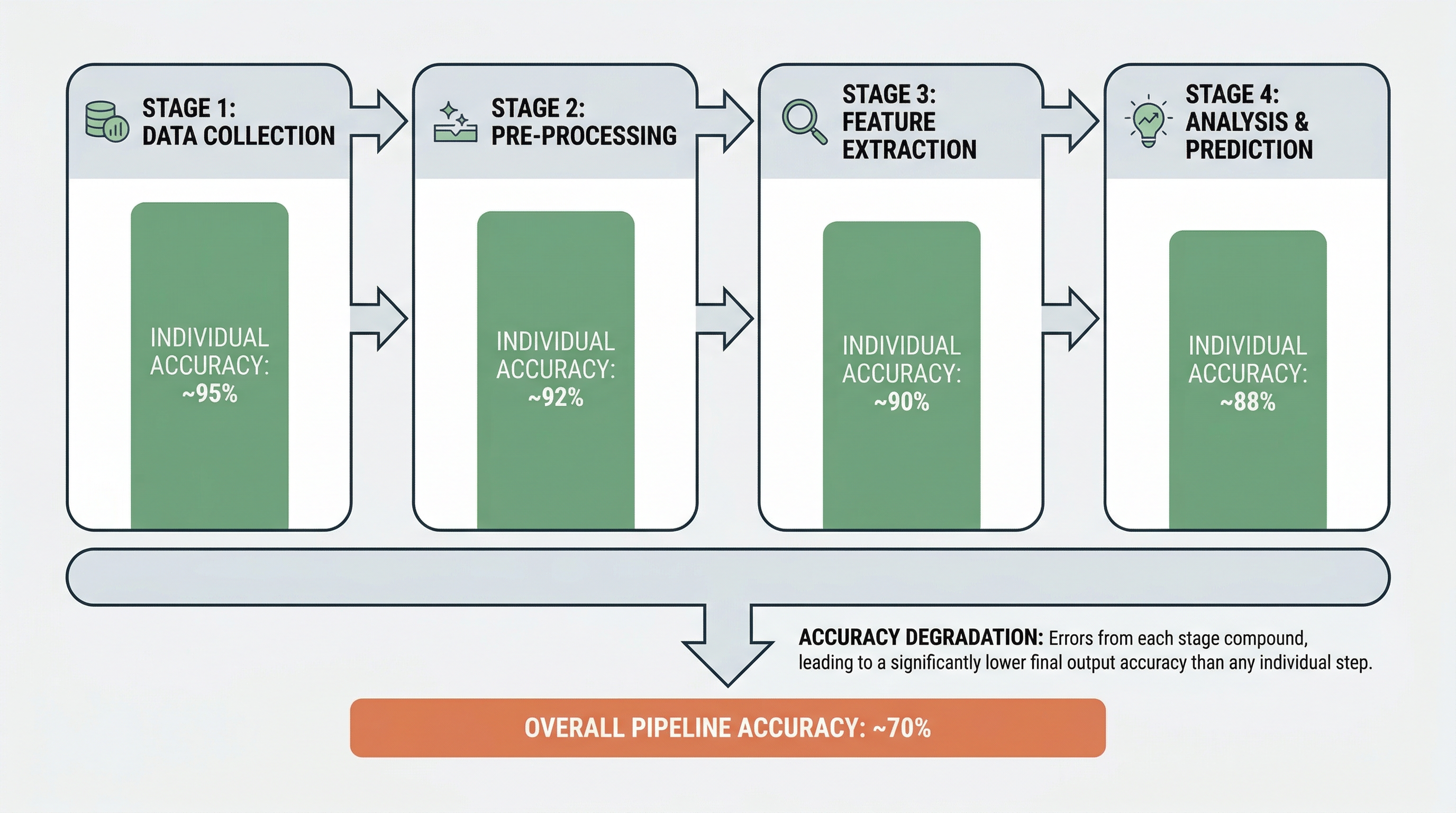
Error propagation is multiplicative, not additive. If each of four stages is 95% accurate and errors are independent, the pipeline is roughly 0.95^4 ≈ 81% accurate — and in practice errors correlate (a badly scanned page corrupts every later stage), making it worse. Generative stages add a wrinkle: a model can produce a fluent, plausible, wrong value that looks more trustworthy than a garbled OCR string, so downstream validation matters even more.
Mitigate with several strategies. Validate early: catch errors near the source, where they are cheapest to fix, and validate the model’s structured output against your schema and business rules. Carry confidence forward: if Stage 1 reports low OCR confidence on a passage, downstream stages should treat that passage with extra caution. Design idempotent stages: re-processing after fixing an upstream error should yield correct results without manual fiddling. Log lineage: track which upstream outputs fed each downstream result so errors trace back to their source.
|
Design pipelines to fail gracefully at each stage. If extraction fails on a document, the document should still be intaken and indexed — just with missing fields flagged for later extraction. A pipeline that halts entirely because one stage fails on one document will not survive contact with real-world data. |
6.8 Hands-On Connections
This chapter connects to six labs — the heaviest lab week in the course. Each targets a specific AI-103 capability, and together they take you from prompting for structured text all the way to a real-time voice agent.
Lab 12: Analyze Text
In Lab 12, you use generative prompting and Foundry Tools to analyze sample documents. Focus on:
-
Structured output. Define a JSON schema and observe how schema-constrained responses eliminate fragile parsing. What happens when you add or remove a field?
-
One prompt, many tasks. See how a single prompt returns entities, a summary, topics, and sentiment at once. How does this compare to calling separate endpoints?
-
Translator tool vs. inline translation. Translate a foreign-language passage both with the Azure Translator Foundry Tool and by asking the model directly. Where do the results diverge, and which would you trust for a filing?
Lab 13: Develop a Text Analysis Agent
In Lab 13, you build an agent that performs text analysis by selecting among prompts and tools. Focus on:
-
Tool routing. Watch the agent decide when to call Translator vs. extract directly. What instructions make its routing reliable?
-
Batch behavior. Run the agent over a mixed batch of documents. How does it handle an unexpected document type compared to a hard-coded script?
-
Guardrails. Where would you gate the agent’s write/persistence tool behind confidence or human review?
Lab 14: Use Speech-Capable Generative AI Models
In Lab 14, you work with a model that takes audio in and produces audio out natively. Focus on:
-
Nuance preservation. Give the model an emotionally-toned clip and ask about tone. What does it catch that a plain transcript would lose?
-
Latency. Compare the responsiveness of the native speech-capable model to a stitched STT-then-model-then-TTS loop.
-
When to use it. Identify a task where you would still prefer discrete STT/TTS over the speech-capable model, and explain why.
Lab 15: Recognize and Synthesize Speech
In Lab 15, you use Azure AI Speech for speech-to-text and text-to-speech. Focus on:
-
Recognition accuracy. Test STT across audio qualities and speaking styles. How do noise and speed affect results?
-
SSML control. Use SSML to fix pronunciation, rate, and emphasis. How much does it improve naturalness for legal content?
-
Voice selection. Compare neural voices. Which feels appropriate for a professional legal application?
Lab 16: Use Azure Speech in an Agent
In Lab 16, you wrap an agent in a speech loop — STT in, agent reasoning, TTS out. Focus on:
-
End-to-end flow. Trace a spoken question through STT, the agent’s tool calls, and TTS. Where does the latency accumulate?
-
Streaming. Enable streaming synthesis and partial recognition. How much does perceived latency drop?
-
Failure communication. When recognition is low-confidence, how does the agent convey uncertainty through voice?
Lab 17: Develop a Voice Live Agent
In Lab 17, you build a real-time, speech-to-speech voice agent with the Voice Live API. Focus on:
-
Interruption and end-of-turn. Interrupt the agent mid-sentence and let it finish your thought. How do interruption detection and end-of-turn detection change the feel of the conversation versus Lab 16’s loop?
-
Connection model. Observe the persistent WebSocket stream. How does continuous streaming differ from the request/response loop you built in Lab 16?
-
Reusing the agent. Connect the Voice Live front end to the agent and tools (including MCP) you built earlier. What carried over unchanged?
6.9 Assessment Preparation
This chapter connects to the Generative Text & Voice Pipeline Design assessment, in which you diagram a generative/agent text pipeline (with an optional voice front end) and write a justification of your design decisions (800-1,200 words).
The Business Scenario
Carter, Reeves & Associates needs a document and voice system that will:
-
Accept documents in multiple formats — PDFs, Word documents, scanned images, emails — and normalize them into processable text.
-
Extract key entities and a summary — party names, dates, monetary amounts, jurisdictions, case numbers, statutory references — as a structured record, and tag each document with its practice area.
-
Detect tone and conflict/safety flags in client correspondence and route high-priority items.
-
Translate foreign-language filings when reliability matters.
-
Index records for natural-language search, and expose a real-time voice agent attorneys can talk to.
The Deliverables
Two components. First, a pipeline diagram showing every stage, the prompt/tool/agent used at each, the data flowing between stages, the human-review integration points, and where the Voice Live agent attaches. Second, a written justification (800-1,200 words).
Guiding Your Thinking
Prompt vs. tool vs. agent. For each stage, would you reach for a raw prompt, a deterministic Foundry Tool (e.g., Translator), or an agent that orchestrates several? Justify each choice. Review Sections 6.2 through 6.6.
Structured output and data flow. What schema does each stage produce, and is it compatible with the next stage’s input? Where do you need normalization or validation steps? See Sections 6.2.1 and 6.7.1.
Voice modality. Where does speech belong — discrete STT/TTS, a speech-capable model, or a Voice Live agent? What does Voice Live’s interruption and end-of-turn handling buy the attorney experience (Section 6.6.2)?
Limitations and risks. What could go wrong? Consider error propagation (Section 6.7.5) — including fluent-but-wrong generative output — performance bottlenecks (Section 6.7.4), and where you place human review (Section 6.7.3). How does your design contain these risks?
Do not restate the chapter. Apply the concepts, make decisions, and defend them with reasoning that shows you understand the tradeoffs.
6.10 Key Terms
- structured extraction
-
The practice of prompting a generative model to return information in a fixed, machine-readable shape (typically JSON conforming to a defined schema) rather than as free-form prose.
- named entity recognition (NER)
-
The task of identifying entities in text and classifying them into categories (Person, Organization, Location, DateTime, and domain-specific types); in a generative-first approach, performed by prompting for the desired entity fields rather than calling a fixed model.
- key phrase extraction
-
Identifying the main concepts in a text and returning them as a list of meaningful phrases that capture its substance.
- sentiment analysis
-
Examining text and returning a sentiment label (positive, negative, neutral, or mixed), and — with generative prompting — a characterization of tone.
- Foundry Tools
-
Governed, deterministic capabilities (such as Azure Translator and language-analysis tools) that a prompt or agent can call when reproducible, auditable results are required, as opposed to free-form model output.
- text-analysis agent
-
An agent whose job is text analysis — it selects among structured-extraction prompts and Foundry Tools to process documents, routing each to the right capability and emitting a uniform structured record.
- speech-to-text (STT)
-
An Azure AI Speech capability that converts spoken audio into written text, supporting real-time and batch processing modes, word-level timestamps, confidence scores, and speaker diarization.
- text-to-speech (TTS)
-
An Azure AI Speech capability that converts written text into synthesized spoken audio using neural voices.
- Speech Synthesis Markup Language (SSML)
-
An XML-based language for controlling text-to-speech output, including voice selection, speaking rate, pitch, emphasis, pauses, and pronunciation.
- custom speech model
-
A speech recognition model trained on domain-specific vocabulary and audio to improve transcription accuracy for specialized terminology.
- speech-capable model
-
A generative model with an audio modality that accepts audio input and produces audio output natively — reasoning over paralinguistic cues and reducing latency by avoiding a separate transcribe-then-synthesize round trip.
- Voice Live
-
A unified, low-latency, WebSocket-based speech-to-speech API (part of Foundry Tools / Azure Speech, compatible with the Azure OpenAI Realtime API) for building real-time voice agents, featuring noise suppression, interruption detection, end-of-turn detection, optional avatars, and MCP support.
- end-of-turn detection
-
A Voice Live capability that determines when a speaker has actually finished their turn — rather than merely paused — so the agent responds at the natural moment instead of talking over the user or leaving awkward silence.
- confidence score
-
A numeric value (typically between 0 and 1) indicating how certain a service or model is about a result, used to filter outputs and trigger human review for uncertain cases.
- NLP pipeline
-
A sequence of processing stages where each stage performs a specific text- or speech-processing task and passes its output as input to the next stage.
- error propagation
-
The phenomenon in multi-stage pipelines where errors in early stages compound as they flow downstream, reducing overall accuracy — worsened in generative pipelines by fluent-but-wrong outputs that appear trustworthy.
6.11 Chapter Summary
This chapter recast text and speech the way AI-103 now teaches them: not as a rack of pre-built endpoints, but as generative prompting and agent modalities. You began with text analysis as a prompting problem — extracting entities, topics, and summaries as structured JSON, judging sentiment, tone, safety, and sensitive content, and translating either with the Azure Translator Foundry Tool (when reproducibility matters) or with the model directly (when speed and flexibility do). You saw that you customize outputs for your domain by editing a prompt, not by training a classifier.
You then wrapped that prompting in a text-analysis agent that routes documents among extraction prompts and Foundry Tools, handling a stream of inputs the way a script cannot easily evolve to. Speech entered next as a first-class modality: speech-capable generative models that take audio in and produce audio out natively; the discrete speech-to-text and text-to-speech fundamentals with SSML; Azure Speech in an agent as a stitched STT-reason-TTS loop; and finally the Voice Live API — a unified, low-latency, WebSocket speech-to-speech path with noise suppression, interruption detection, end-of-turn detection, optional avatars, and MCP support — that turns the same agent you built for text into a voice-native assistant.
Finally, you composed these blocks into a generative text pipeline — intake, language handling, structured extraction, persistence and indexing — making deliberate prompt-vs-tool-vs-agent choices at each stage, placing human review where errors carry the highest cost, and designing for error containment and graceful failure. The six labs this week span structured text analysis, a text-analysis agent, speech-capable models, discrete STT/TTS, speech in an agent, and a Voice Live voice agent.
In Chapter 7, Vision: Multimodal Understanding & Image Generation, you will apply the same generative-first, agent-oriented thinking to a new domain: understanding images with multimodal models and generating images from prompts. The architectural patterns you built here — prompting for structured output, composing capabilities into pipelines, containing error propagation, and integrating human review — transfer directly.