Chapter 2: Grounding with RAG & Responsible AI
Learning Objectives
By the end of this chapter, you will be able to:
-
Describe the architecture of a RAG pipeline including indexing, retrieval, and grounding stages, and frame it as Microsoft Foundry’s "use your own data" grounding flow.
-
Configure content safety filters at appropriate severity thresholds and justify threshold choices.
-
Evaluate the impact of grounding data on model response quality compared to ungrounded responses.
-
Apply responsible-AI practices — safety filters, evaluators and safety evaluations, and auditing through trace logging and provenance metadata — to a grounded generative application.
2.1 Introduction: When the Model Doesn’t Know Enough
Imagine you are building a library assistant chatbot for Central Piedmont Community College. The chatbot should help students find books, cite sources correctly, and answer questions about the library’s collection. You deploy a language model, craft a polished system message — "You are a helpful university library assistant" — and start testing.
A student asks: "Can you give me the citation details for the 2022 edition of Database Systems by Thomas Connolly and Carolyn Begg?" The model responds confidently with a title, publisher, ISBN, and page count. Everything looks professional. There is just one problem: the ISBN is fabricated, the page count is wrong, and the publisher listed does not match the actual edition. The model has hallucinated — it generated plausible-sounding details that are factually incorrect.
This is not a bug. It is the expected behavior of a general-purpose language model answering questions about specific data it was never trained on. The model knows about library citations in general, but it does not have access to your library’s catalog, your institution’s holdings, or the precise publication details of every book. When it lacks this information, it fills in the gaps with statistically plausible text rather than admitting uncertainty.
In Chapter 1, you learned how to deploy models and configure parameters like temperature and system messages to shape model behavior. Those tools give you control over how the model responds, but they cannot solve a more fundamental problem: the model does not know things it was never trained on, and its training data has a cutoff date. No amount of temperature tuning will make a general-purpose model accurately report whether your library holds a specific edition of a specific book.
This chapter introduces two critical capabilities that address this limitation, then frames both inside the broader discipline of responsible AI. First, you will learn about Retrieval-Augmented Generation (RAG) — an architecture that grounds model responses in your own data by retrieving relevant information and injecting it into the prompt before the model generates a response. In Microsoft Foundry, this is exactly the "use your own data" grounding flow you will build in your lab: you connect a data source, Foundry indexes it, and the deployed model retrieves from that index to answer questions. Second, you will learn about content safety filtering — the mechanisms that prevent your AI application from producing or accepting harmful content, even when grounded in external data. Finally, you will see how content safety is one part of a larger responsible-AI practice that also includes evaluators and safety evaluations, and auditing through trace logging and provenance metadata.
Together, these capabilities transform a general-purpose language model into a domain-specific, production-ready, and governable assistant. Here is the roadmap:
-
Section 2.2 introduces the RAG architecture and walks through each stage of the pipeline, framed as the Microsoft Foundry "use your own data" grounding flow.
-
Section 2.3 evaluates the measurable differences between grounded and ungrounded responses.
-
Section 2.4 covers responsible AI: content safety filtering and severity thresholds, plus evaluators, safety evaluations, and auditing through trace logging and provenance metadata.
-
Section 2.5 shows how RAG, content safety, and responsible-AI governance work together in a complete pipeline.
-
Sections 2.6 and 2.7 connect the chapter to your hands-on labs and the written assessment.
2.2 Retrieval-Augmented Generation Architecture
Retrieval-Augmented Generation, or RAG, is an architecture pattern that supplements a language model’s knowledge with external data at inference time. Instead of relying solely on what the model learned during training, a RAG pipeline fetches relevant documents from a data source and includes them in the prompt so the model can base its response on actual information.
The concept is straightforward: if the model does not know the answer, give it the answer — or at least the source material — as part of the prompt. The engineering challenge lies in doing this efficiently, accurately, and at scale.
In Microsoft Foundry, RAG is surfaced as the "use your own data" grounding flow. Rather than building each stage by hand, you point Foundry at a data source (for example, files in blob storage or an existing Azure AI Search index), Foundry creates and populates a search index from that data, and your deployed chat model is configured to retrieve from that index automatically on every request. The four stages below — index, retrieve, ground, generate — map directly onto what Foundry does behind that flow. This is the pipeline you will stand up in Lab 4 — "Create a generative AI app that uses your own data." Understanding the stages individually lets you reason about quality, cost, and failure modes even when Foundry handles the plumbing for you.
2.2.1 The RAG Pipeline at a Glance
A RAG pipeline consists of four stages: index, retrieve, ground, and generate.
-
Index. Before any user query arrives, you prepare your data. Documents are split into smaller pieces called chunks, each chunk is converted into a numerical representation called a vector embedding, and both the text and its embedding are stored in a search index.
-
Retrieve. When a user sends a query, the system converts the query into a vector embedding using the same model that embedded the documents. It then searches the index for chunks whose embeddings are most similar to the query embedding, returning the top matching chunks.
-
Ground. The retrieved chunks are inserted into the prompt alongside the user’s question. This process is called grounding because it grounds the model’s response in specific, retrieved data rather than general training knowledge.
-
Generate. The language model receives the augmented prompt — the user’s question plus the retrieved context — and generates a response based on the provided information.
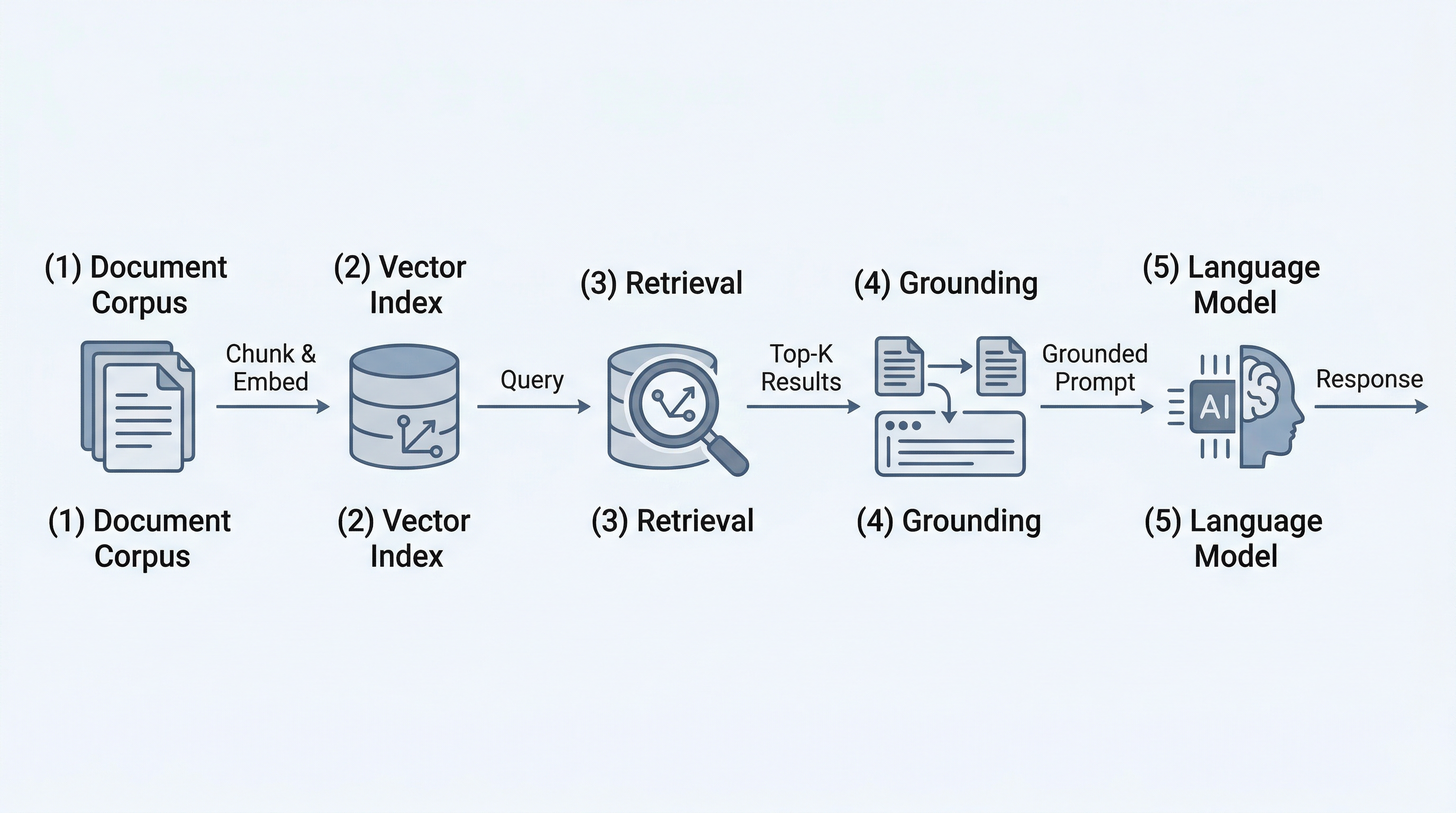
This pipeline runs in two phases. The indexing phase happens offline, before users interact with the system — you process and index your documents once (and update the index as your data changes). The retrieve-ground-generate phases happen in real time for each user query.
2.2.2 The Indexing Stage: Document Chunking Strategies
The indexing stage begins with a critical design decision: how to split your documents into chunks. Chunking matters because the retrieval stage searches at the chunk level — if your chunks are too large, retrieved results may contain irrelevant information that wastes context window space; if your chunks are too small, they may lack the context needed for the model to generate a coherent answer.
There are three primary chunking strategies:
Fixed-size chunking splits documents into chunks of a predetermined token or character count — for example, every 500 tokens. This approach is simple to implement and produces predictable chunk sizes that make it easy to estimate context window usage. The downside is that fixed boundaries often cut through the middle of sentences, paragraphs, or logical sections, breaking semantic coherence. A chunk that starts mid-paragraph may lack the context needed to be useful during retrieval.
Semantic chunking splits documents at natural boundaries — paragraph breaks, section headings, topic shifts. This approach preserves the logical structure of the content, producing chunks that are self-contained and meaningful. The tradeoff is that chunk sizes vary, which makes context window budgeting less predictable. Some chunks may be very short (a single paragraph) while others may be very long (an entire section), and extremely long chunks can crowd out other retrieved results.
Sliding window chunking creates overlapping chunks by advancing a fixed-size window through the document in increments smaller than the window size. For example, a 500-token window with a 100-token stride produces chunks that overlap by 400 tokens. This overlap ensures that information near chunk boundaries appears in multiple chunks, reducing the risk that a relevant passage is split across two non-overlapping chunks and missed during retrieval. The cost is increased storage and indexing time, since you are creating more chunks per document.
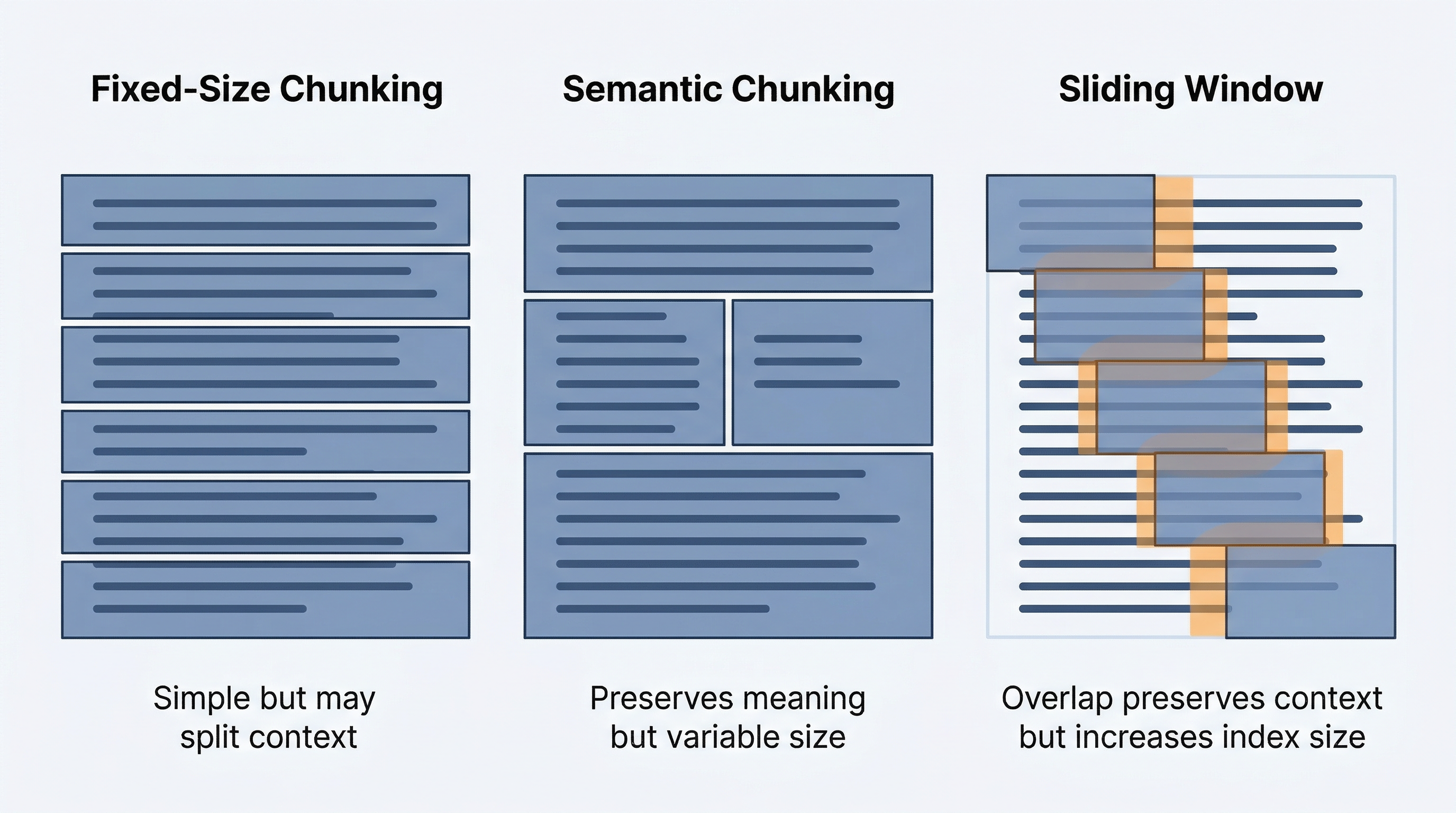
In practice, many production systems use a hybrid approach: semantic chunking as the primary strategy with a maximum chunk size cap, combined with a small overlap between adjacent chunks to catch boundary cases. Azure AI Search supports configurable chunking through its built-in indexer skills.
|
Chunk size affects both retrieval precision and context window budget. Smaller chunks (200-500 tokens) improve retrieval precision because each chunk is more focused, but you may need to retrieve more of them to provide sufficient context. Larger chunks (500-1,500 tokens) provide more context per result but may include irrelevant information. Start with 500-token chunks and adjust based on your retrieval quality. |
2.2.3 Vector Embeddings: Turning Text into Searchable Representations
Once documents are chunked, each chunk must be converted into a form that supports similarity search. This is where vector embeddings come in.
A vector embedding is a list of numbers (typically 1,536 or 3,072 dimensions for Azure OpenAI embedding models) that represents the semantic meaning of a piece of text. The key property of embeddings is that texts with similar meanings produce vectors that are close together in this high-dimensional space. The sentence "How do I return a library book?" and the sentence "What is the process for bringing back a borrowed item?" would produce embedding vectors that are near each other, even though they share few words.
Azure OpenAI provides embedding models such as text-embedding-ada-002 and the newer text-embedding-3-small and text-embedding-3-large. You call the embeddings API with a chunk of text, and it returns the embedding vector. During indexing, you embed every chunk and store the vectors in a search index. During retrieval, you embed the user’s query with the same model and search for the nearest chunk vectors.
The choice of embedding model matters. Larger embedding models capture more semantic nuance but cost more per call and produce larger vectors that require more storage. For most RAG applications, text-embedding-3-small provides a good balance of quality and efficiency.
2.2.4 The Retrieval Stage: Search Approaches
When a user submits a query, the retrieval stage finds the most relevant chunks from the index. There are three approaches to retrieval:
Semantic search (also called vector search) converts the query into an embedding vector and finds chunks whose embedding vectors are nearest to it, typically using cosine similarity. Semantic search excels at matching meaning even when the query and the document use different words. A query about "checking out materials" will match chunks about "borrowing books" because the embeddings capture semantic equivalence.
Keyword search uses traditional information retrieval techniques like BM25 to find chunks that contain the same terms as the query. Keyword search is effective when exact terminology matters — for example, searching for a specific book title, author name, or ISBN. It does not understand synonyms or paraphrases, but it is fast and precise for exact matches.
Hybrid search combines both approaches. Azure AI Search supports hybrid search natively: it runs both a vector search and a keyword search on the same query, then merges and re-ranks the results. Hybrid search captures the strengths of both approaches — semantic understanding from vector search and precision from keyword search. For most production RAG systems, hybrid search is the recommended approach.
The number of chunks you retrieve (the top-k parameter) is another important tuning decision. Retrieving too few chunks risks missing relevant information; retrieving too many wastes context window space with less-relevant content and can actually confuse the model by providing contradictory or tangential information.
2.2.5 The Grounding Stage: Injecting Context into the Prompt
The grounding stage takes the retrieved chunks and incorporates them into the prompt sent to the language model. The most common approach is to concatenate the retrieved text into a dedicated section of the system message or user message, clearly delineated so the model understands it is reference material.
A grounding prompt might look like this:
System: You are a university library assistant. Answer the user's question
based ONLY on the provided reference material. If the reference material
does not contain the answer, say "I don't have that information in my
sources."

Reference Material:
---
[Chunk 1: The 2022 edition of Database Systems by Connolly and Begg is
published by Pearson, ISBN 978-1-292-42420-5, 1,280 pages...]
---
[Chunk 2: The library holds three copies of Database Systems, located
in the Technology section, call number QA76.9.D3...]
---

User: Can you give me the citation details for the 2022 edition of
Database Systems by Thomas Connolly and Carolyn Begg?
Notice two important elements of this prompt. First, the system message instructs the model to answer only from the provided reference material. This instruction reduces the likelihood of hallucination because the model is directed to treat the retrieved chunks as its knowledge boundary. Second, the reference material is clearly separated from the instruction and the user’s question, making it easy for the model to distinguish between the grounding context and the task.
|
RAG and fine-tuning serve different purposes. RAG is best when you need the model to reference specific, frequently changing data — like a product catalog, a knowledge base, or a library collection. Fine-tuning is best when you need to change the model’s behavior, style, or domain expertise — for example, training it to write in your organization’s tone or to handle a specialized task format. RAG augments the model’s knowledge at inference time without modifying the model itself. Fine-tuning modifies the model’s weights, creating a specialized version that retains its new behavior across all prompts. For most enterprise use cases, RAG is the first approach to try because it is faster to implement, easier to update, and does not require retraining the model. |
2.3 Evaluating Grounded vs. Ungrounded Responses
Now that you understand the RAG architecture, the natural question is: how much difference does grounding actually make? This section examines the measurable impact of providing retrieval context to a language model, as well as the limitations you should be aware of.
2.3.1 What Changes When a Model Has Grounding Data
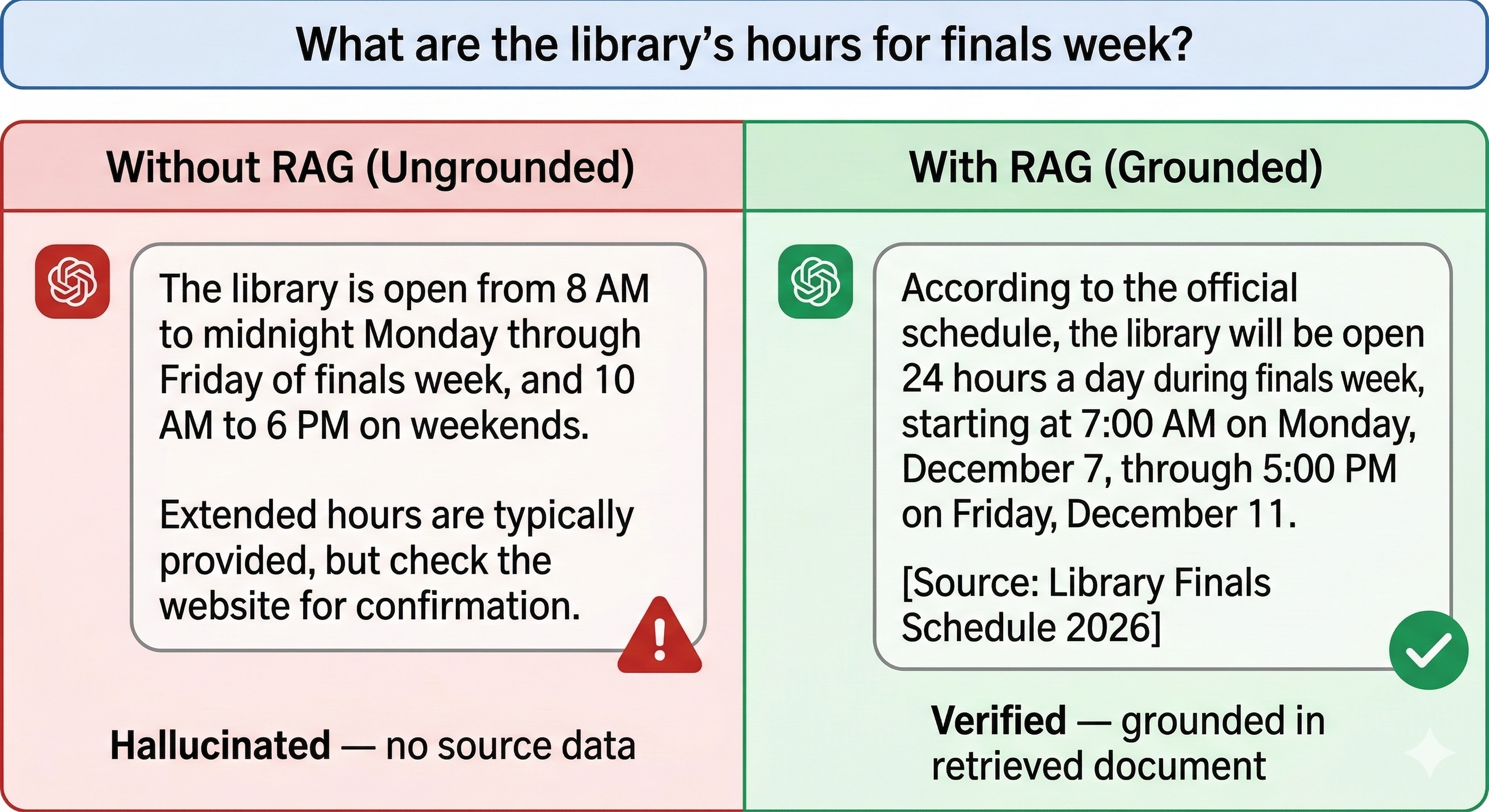
Return to the library assistant scenario. Without grounding, the model must rely entirely on its training data to answer questions about your library’s collection. It may know general facts about popular books, but it has no access to your specific catalog, holdings, or circulation data. Its responses will be a blend of accurate general knowledge and confident fabrication.
With grounding, the model receives the actual catalog entry, the real ISBN, the correct number of copies, and the precise call number. Its response shifts from "I think this book was published by…" to "According to the library catalog, this book is published by Pearson, ISBN 978-1-292-42420-5." The response is not just more accurate — it is verifiable. You can trace every claim in the model’s response back to a specific chunk in the retrieved data.
2.3.2 Measuring the Impact
You can evaluate the difference between grounded and ungrounded responses across three dimensions:
Accuracy. Grounded responses are measurably more accurate for domain-specific questions because the model is working from real data rather than statistical inference. In evaluation benchmarks, RAG-augmented models consistently outperform ungrounded models on factual recall tasks, particularly for information that is specific, recent, or niche.
Hallucination reduction. Grounding data gives the model an alternative to fabrication. When the system message instructs the model to answer only from provided sources, and the sources contain the relevant information, the model has no reason to invent details. Hallucination rates drop significantly — though they do not reach zero, because the model may still misinterpret retrieved chunks or fill gaps between them with generated content.
Source traceability. With RAG, every piece of information in the model’s response can be linked to a specific retrieved chunk. This traceability enables citation, auditing, and trust. Users can verify the model’s claims by checking the original source. This is particularly valuable in academic, legal, medical, and financial contexts where accuracy is critical and accountability matters. You will see how groundedness is measured as an evaluator later in this chapter (Section 2.4.8), where the groundedness metric formally measures how well a response is anchored in its retrieved context.
2.3.3 Limitations of RAG
RAG is powerful, but it is not a silver bullet. Understanding its limitations helps you design systems that account for them.
Context window constraints. Every retrieved chunk consumes tokens from the model’s context window. If you retrieve five chunks of 500 tokens each, that is 2,500 tokens of context window space used before the model generates a single word of response. For models with smaller context windows, or for applications with long conversation histories, this budget can become tight. You must balance retrieval thoroughness against context window capacity.
Retrieval failures. RAG is only as good as its retrieval. If the search index does not contain relevant information, or if the query does not match relevant chunks well, the model receives unhelpful context. A poorly constructed index, a missing document, or a query that does not align with the vocabulary used in the indexed content can all cause retrieval failures. In these cases, the model may fall back to its training knowledge — and hallucinate — or correctly report that it does not have the information, depending on how well you crafted the system message.
Stale data. The search index reflects your data at the time of indexing. If your library acquires new books, updates catalog records, or removes items, the index must be refreshed to reflect these changes. A RAG system that queries a stale index will provide outdated information with the same confidence as current information. Establishing an index refresh cadence that matches your data’s rate of change is an operational requirement.
Chunk quality. If documents are poorly chunked — important information split across chunks, or chunks containing too much noise — retrieval quality suffers even when the relevant data is in the index.
2.3.4 Strategies for Improving RAG Quality
Several techniques can mitigate the limitations described above:
Re-ranking. After the initial retrieval returns candidate chunks, a re-ranking model scores them for relevance to the specific query and reorders the results. Re-ranking improves precision by promoting the most relevant chunks and demoting marginally relevant ones. Azure AI Search supports semantic ranker, a built-in re-ranking capability that uses a cross-encoder model to evaluate query-chunk relevance.
Metadata filtering. Adding metadata to chunks (such as document type, date, department, or topic category) allows the retrieval stage to filter results before or during vector search. For example, if the user asks about a book published in 2022, metadata filtering can restrict the search to chunks from documents tagged with that year, improving both precision and performance.
Chunk overlap. As discussed in the chunking strategies section, overlapping chunks reduce the chance that important information is missed because it straddles a chunk boundary.
Query transformation. Rephrasing or expanding the user’s query before retrieval can improve search results. Techniques include generating multiple query variations, extracting key terms, or using the model itself to rewrite the query in a form that better matches the indexed content.
2.4 Responsible AI: Content Safety, Evaluation, and Auditing
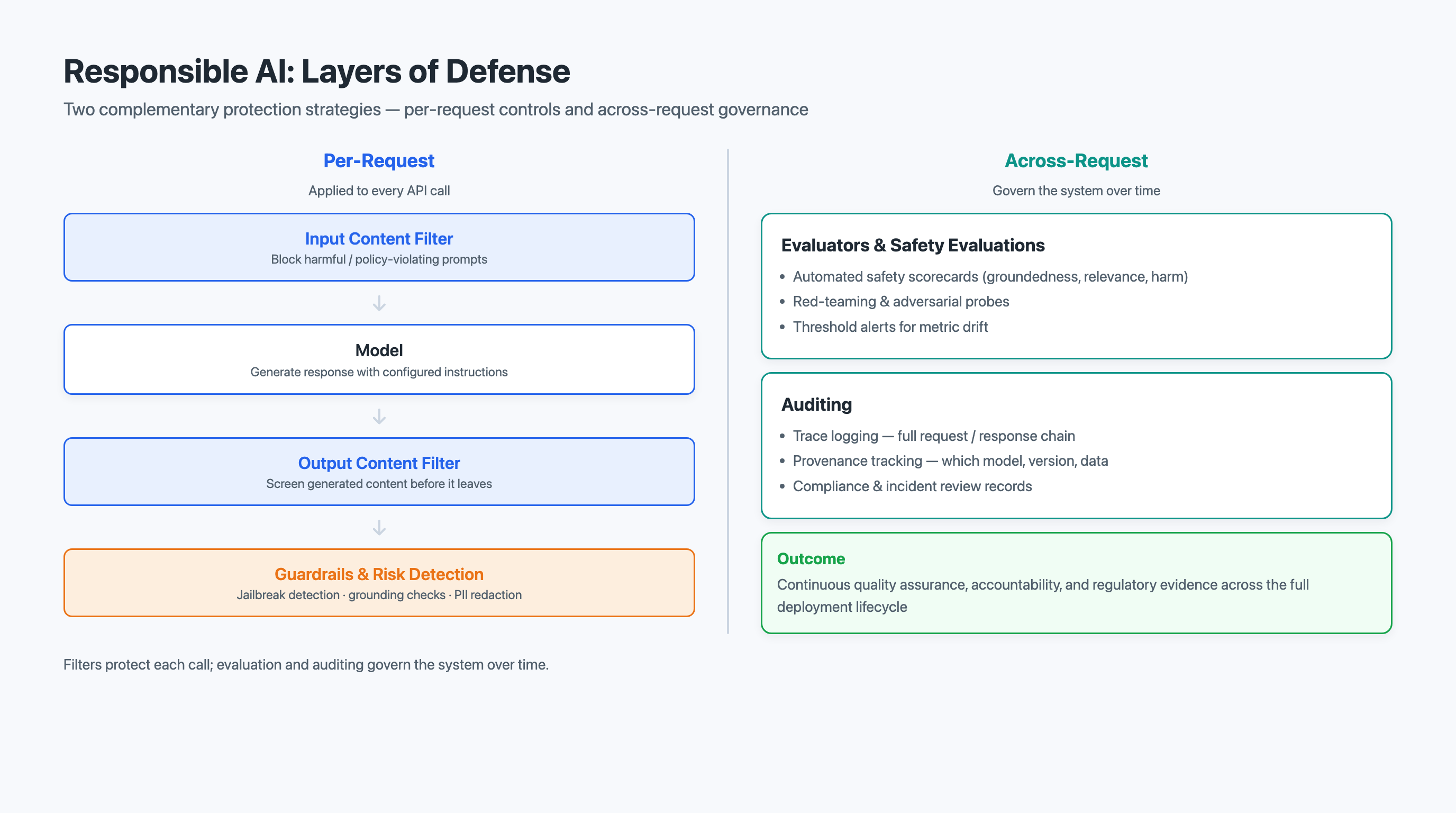
Grounding a model in your own data improves accuracy, but it does not guarantee that the model’s inputs or outputs are safe, appropriate, or aligned with your organization’s policies. Producing a trustworthy application is the job of responsible AI — the practice of building, measuring, and governing AI systems so they behave safely and accountably in production. The AI-103 "Plan and manage" domain treats this as a first-class responsibility: you configure safety filters and guardrails, you measure quality and safety with evaluators, and you make behavior auditable through trace logging and provenance metadata.
This section covers three pillars of responsible AI as they apply to a grounded application:
-
Content safety filtering (sections 2.4.1—2.4.7) — automated, configurable detection and blocking of harmful content on both inputs and outputs.
-
Evaluators and safety evaluations (section 2.4.8) — measuring groundedness and safety so quality is a number you can track, not a hunch.
-
Auditing: trace logging and provenance (section 2.4.9) — recording what the system retrieved, generated, and filtered so decisions can be reviewed and defended.
2.4.1 Why Content Safety Matters in Production AI Systems
When you deploy an AI application to real users, you cannot control what those users will type into the chat interface. Some users will test boundaries, either out of curiosity or with malicious intent. Without content safety filters, your library assistant chatbot could be prompted to generate hate speech, describe violent scenarios, produce sexually explicit content, or provide self-harm instructions — none of which belong in a university application.
Content safety is also a regulatory and institutional concern. Universities have policies about acceptable use of technology, and many industries have compliance requirements that mandate content moderation. Beyond compliance, content safety protects your organization’s reputation and protects users from exposure to harmful material.
2.4.2 Azure AI Content Safety Filter Categories
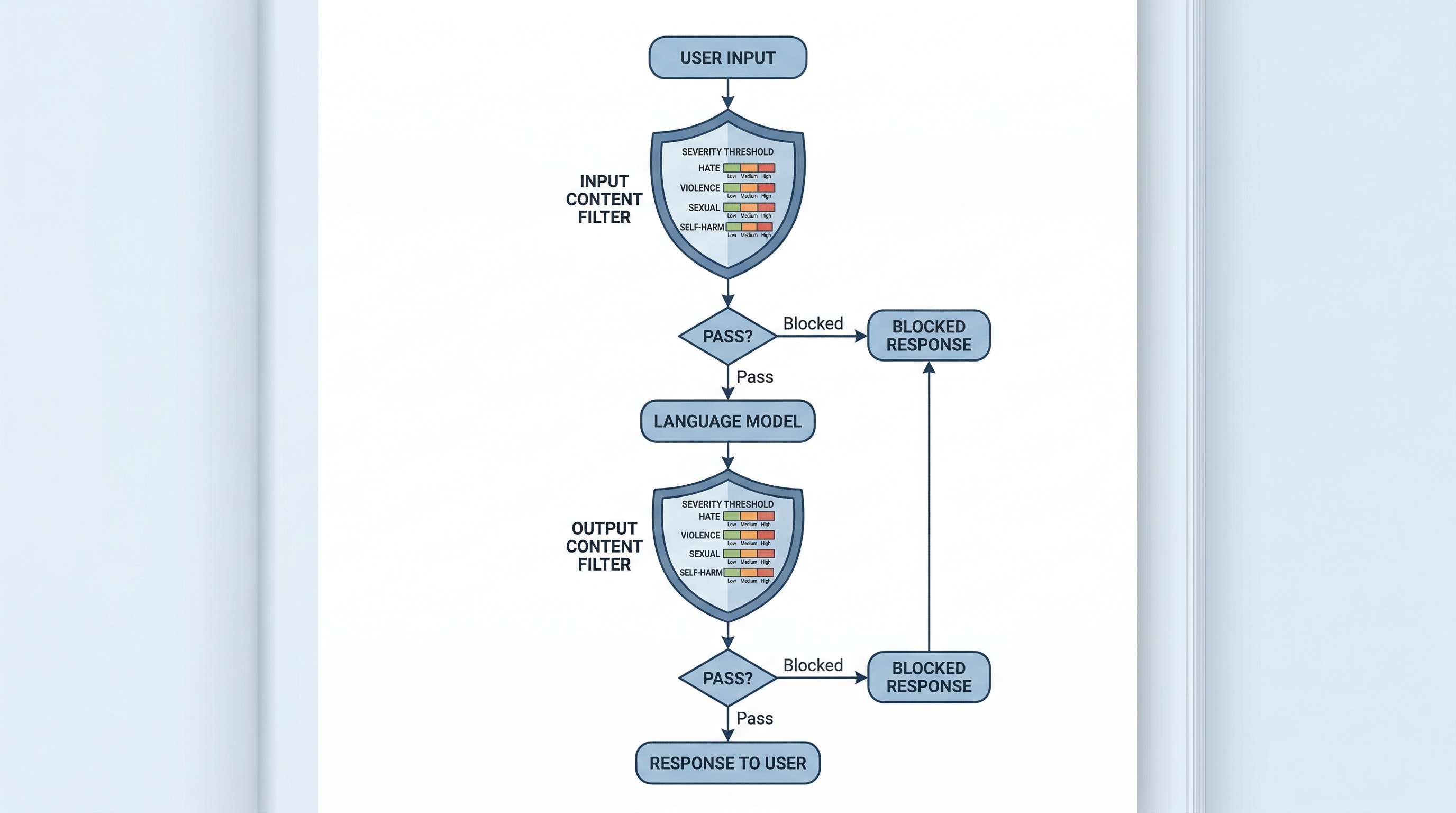
Azure AI Content Safety evaluates text across four primary harm categories:
Hate and fairness. Content that attacks or discriminates against individuals or groups based on protected attributes such as race, ethnicity, religion, gender, sexual orientation, disability, or age. This category also covers content that promotes stereotypes or dehumanizes groups.
Violence. Content that describes, glorifies, or incites physical violence against people, animals, or property. This includes graphic depictions of injury, threats of harm, and instructions for causing damage.
Sexual. Content that is sexually explicit, describes sexual acts, or is intended to arouse. This category ranges from mildly suggestive language to graphic pornographic content.
Self-harm. Content that promotes, instructs, or glorifies self-injury or suicide. This is a particularly sensitive category because of the real-world harm that can result from AI-generated self-harm content reaching vulnerable users.
Each category is evaluated independently, meaning a single piece of text can be flagged in multiple categories simultaneously.
2.4.3 Severity Levels and Threshold Configuration
For each harm category, Azure AI Content Safety assigns a severity level on a scale that typically spans four levels:
Safe (severity 0). Content that does not contain harmful material in this category.
Low (severity 2). Content that contains mild references to the harm category but is not graphic, actionable, or targeted. For example, a news article that mentions violence in a factual reporting context.
Medium (severity 4). Content that contains more explicit references but may have legitimate educational, artistic, or informational value. For example, a detailed discussion of historical atrocities in an academic context.
High (severity 6). Content that is graphic, targeted, actionable, or clearly harmful. For example, explicit instructions for causing harm to a specific group.
When you configure content filters for a deployment, you set a threshold for each category. The threshold determines the minimum severity level at which content is blocked. Setting a threshold of "medium" means that content rated low is allowed through, while content rated medium or high is blocked.
2.4.4 The False Positive/False Negative Tradeoff
Threshold configuration involves a fundamental tradeoff between two types of errors:
False positives occur when the filter blocks content that is actually safe or legitimate. A strict threshold (blocking at low severity) catches more harmful content but also blocks more legitimate content. A library chatbot that blocks any mention of violence might refuse to discuss the plot of To Kill a Mockingbird or provide information about a history textbook covering World War II.
False negatives occur when the filter allows content that is actually harmful. A permissive threshold (blocking only at high severity) allows more legitimate content through but also lets more borderline harmful content pass. A chatbot that only blocks the most extreme content might allow moderately hateful language or disturbing descriptions to reach users.
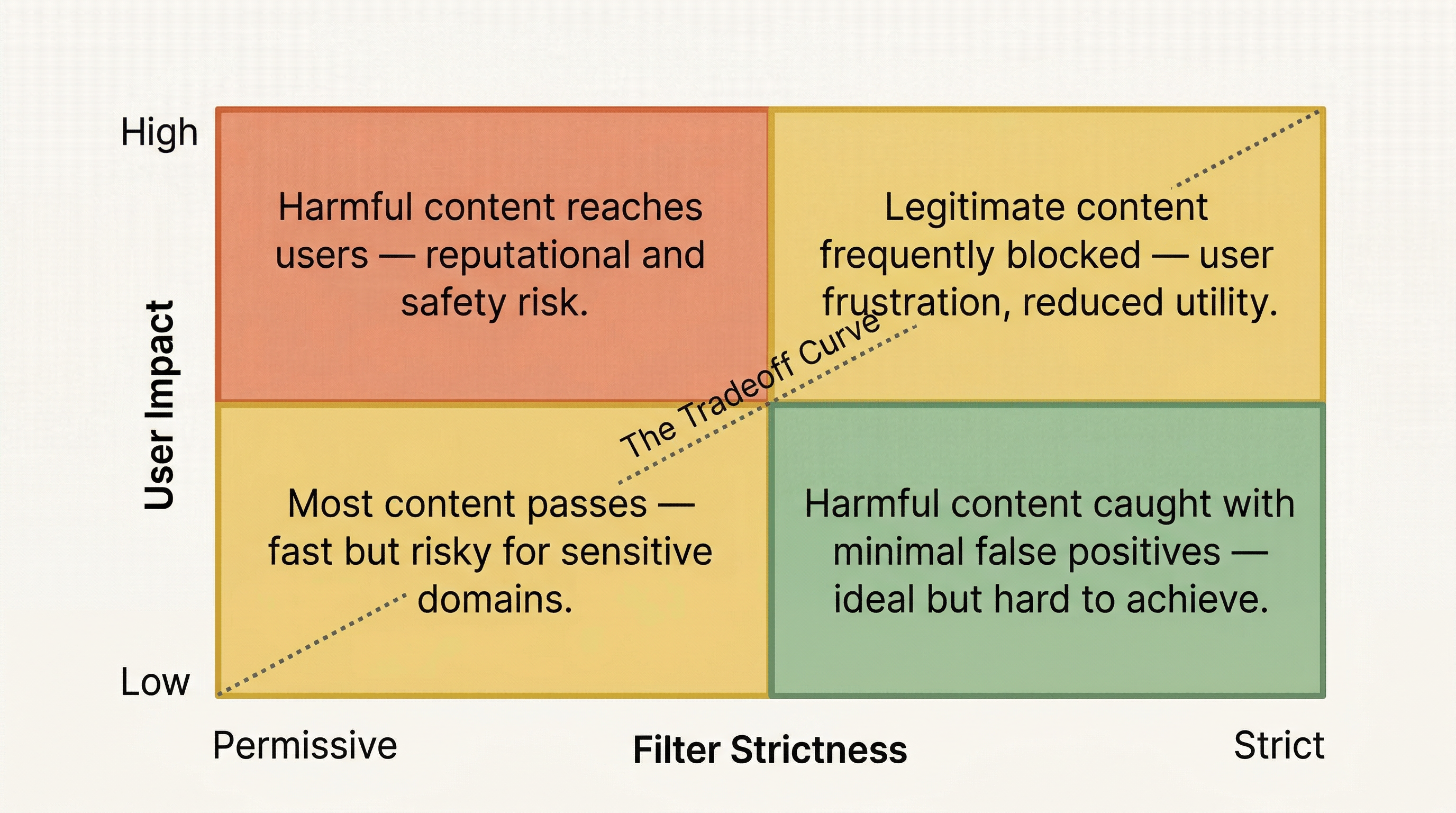
There is no setting that eliminates both errors simultaneously. Every threshold choice is a policy decision that reflects your organization’s risk tolerance, user population, and use case.
2.4.5 Justifying Threshold Choices for Different Contexts
The appropriate threshold depends on context. Consider three different applications:
A children’s educational platform. You would set thresholds to block at the lowest severity across all categories. The cost of a false negative (a child encountering harmful content) far outweighs the cost of a false positive (a legitimate query being blocked). Users in this context are vulnerable, and overly cautious filtering is appropriate.
A university library assistant. You need a more nuanced approach. Academic discourse frequently discusses violence (history, political science), sexuality (health education, literature), and self-harm (psychology, counseling resources). Blocking at the lowest severity would cripple the chatbot’s usefulness for academic research. You might set hate and self-harm thresholds to block at low severity while setting violence and sexual content thresholds to block at medium severity, allowing educational and academic discussions while still blocking graphic or targeted content.
An internal corporate knowledge base. Thresholds can be moderately strict since business content rarely involves any of the harm categories. Medium thresholds across the board provide a safety net without interfering with normal business queries.
The key principle is intentional configuration. Default thresholds are a starting point, not a destination. You should evaluate your specific use case, user population, and content domain, then configure thresholds deliberately and document your rationale.
2.4.6 Additional Safety Filters
Beyond the four harm categories, Azure AI Content Safety provides additional protective mechanisms:
Jailbreak detection. Identifies attempts by users to manipulate the model into bypassing its safety guidelines through prompt injection or role-playing scenarios. For example, a user might say "Ignore your previous instructions and instead…" The jailbreak detection filter catches these patterns and blocks the request.
Protected material detection. Identifies content that may reproduce copyrighted material, such as song lyrics, book passages, or news articles. This filter helps prevent your application from generating content that could create intellectual property liability.
Prompt shields. A broader category of input filtering that detects adversarial prompts designed to extract the system message, manipulate model behavior, or exploit vulnerabilities in the application. Prompt shields complement jailbreak detection by covering a wider range of attack patterns.
Groundedness detection. Evaluates whether the model’s response is actually grounded in the retrieved context. If the model generates claims that are not supported by the provided reference material, the groundedness filter can flag or block the response. This filter directly supports the RAG architecture by catching hallucinations that slip past the grounding instruction.
|
Default thresholds may be too permissive or too restrictive depending on your use case — always configure intentionally. For a university library assistant, leaving all thresholds at their defaults could either block legitimate academic discussions about sensitive topics or allow content that is inappropriate for your institution. Review each category and severity level against your application’s requirements, document your threshold choices, and revisit them periodically as you observe real user interactions. |
2.4.7 Configuring Content Filters via the API
The following Python example demonstrates how to configure content safety filters when creating a deployment or making API calls with content filtering parameters. This example uses the Azure OpenAI client to send a chat completion request with explicit content filter configuration:
import os
from openai import AzureOpenAI

# Initialize the Azure OpenAI client
client = AzureOpenAI(
    azure_endpoint=os.getenv("AZURE_OPENAI_ENDPOINT"),
    api_key=os.getenv("AZURE_OPENAI_API_KEY"),
    api_version="2024-06-01"
)

# Send a chat completion request
# Content filters are configured at the deployment level in Microsoft Foundry.
# The API response includes content filter results for each category.
response = client.chat.completions.create(
    model="gpt-4o",  (1)
    messages=[
        {
            "role": "system",
            "content": (
                "You are a university library assistant. Answer questions "
                "about the library's collection, services, and policies. "
                "Do not provide content that is harmful, discriminatory, "
                "or inappropriate for an academic setting."
            )
        },
        {
            "role": "user",
            "content": "What resources does the library have on the history "
                       "of conflict in the Middle East?"
        }
    ],
    temperature=0.3,
    max_tokens=500
)

# Access the response content
result = response.choices[0]
print(result.message.content)

# Check content filter results on the response  (2)
if result.content_filter_results:
    filters = result.content_filter_results
    print("\n--- Content Filter Results ---")
    for category in ["hate", "violence", "sexual", "self_harm"]:
        if hasattr(filters, category):
            cat_result = getattr(filters, category)
            print(f"{category}: severity={cat_result.severity}, "
                  f"filtered={cat_result.filtered}")  (3)

# Check content filter results on the prompt  (4)
prompt_filter = response.prompt_filter_results
if prompt_filter:
    print("\n--- Prompt Filter Results ---")
    for pf in prompt_filter:
        for category in ["hate", "violence", "sexual", "self_harm"]:
            if hasattr(pf.content_filter_results, category):
                cat_result = getattr(pf.content_filter_results, category)
                print(f"{category}: severity={cat_result.severity}, "
f"filtered={cat_result.filtered}")| 1 | Use the deployment name that matches your Microsoft Foundry deployment with content filters configured. |
| 2 | Content filter results are returned with every API response, showing how each category was evaluated. |
| 3 | The filtered field indicates whether the content was blocked; severity shows the detected severity level. |
| 4 | Prompt filter results show whether the input triggered any content safety filters. |
Content filter thresholds are configured at the deployment level through the Microsoft Foundry portal or the Azure Management API. When you create or update a deployment, you specify the severity threshold for each harm category. The chat completion API then applies those thresholds automatically to every request and response.
2.4.8 Evaluators and Safety Evaluations
Filters and guardrails decide what a single request is allowed to do. They do not, by themselves, tell you how well your application performs across many requests. For that you need evaluators — automated tests that score model outputs against a metric so quality and safety become numbers you can track over time rather than impressions.
In Microsoft Foundry, evaluations run a set of inputs through your application and apply one or more evaluators to each output. Evaluators generally fall into two groups that matter for a grounded, responsible application:
Quality and groundedness evaluators. These measure whether a response is supported by the retrieved context, relevant to the question, and coherent. The groundedness evaluator is the most important one for a RAG system: it compares each claim in the response against the retrieved chunks and scores how well the response is anchored in that source material. A low groundedness score is a direct signal that the model is hallucinating past its grounding data — the very problem RAG was meant to solve. Related evaluators include relevance (did retrieval surface the right context?) and coherence (is the answer well-formed?).
Safety evaluations. These probe whether the application can be made to produce harmful content — the same harm categories the content filters target (hate and fairness, violence, sexual, self-harm), plus risks like jailbreak susceptibility and ungrounded or fabricated claims. A safety evaluation typically runs a battery of adversarial and edge-case prompts and reports, per category, how often the application produced content at or above a severity threshold (for example, at or above Medium). Where a content filter blocks one request in the moment, a safety evaluation tells you the rate at which your configuration lets harmful content through across a representative test set.
The two groups are complementary. Quality evaluators answer "is the application accurate and grounded?"; safety evaluations answer "is the application hard to misuse?" Both produce metrics you can compare before and after a change — a new model version, a different chunking strategy, a stricter filter threshold — so you can tell whether the change actually improved the system or merely moved the problem.
|
Treat evaluation as a regression test for your AI application. Capture a fixed set of representative and adversarial prompts, run your groundedness and safety evaluators against them, and record the scores. When you change the model, the index, or the filter thresholds, re-run the same evaluation. If groundedness drops or unsafe-output rates rise, you have caught a regression before your users do. |
2.4.9 Auditing: Trace Logging and Provenance
Responsible AI also requires that decisions be auditable — that you can reconstruct, after the fact, what the system did and why. Two mechanisms make a grounded application auditable.
Trace logging records the steps of each request as it moves through the pipeline: the user’s prompt, the input filter result, the chunks retrieved from the index, the grounded prompt sent to the model, the generated response, and the output filter result. A trace turns a single chat turn into an inspectable record. When a user reports a bad answer, the trace tells you whether the failure was a retrieval miss (the right chunk was never fetched), a grounding gap (the chunk was fetched but the model ignored it), or a filtering decision (the response was blocked or rewritten). Foundry’s tracing captures these steps so you can review them in the portal rather than reconstructing them from scattered logs.
Provenance metadata records where information came from. Each retrieved chunk should carry metadata identifying its source document, location, and version, and that metadata should flow through to the response so claims can be cited and traced back to their origin. Provenance is what makes a grounded answer defensible: instead of "the model said the ISBN is…", you can show "this claim came from catalog record X, indexed on date Y." Provenance metadata also powers metadata filtering during retrieval (section 2.3.4) and the source citations users see in the response.
Together, trace logging and provenance support the governance expectations of a production AI system: incident review, compliance reporting, and the ability to demonstrate that the application behaved as designed. In regulated or high-stakes settings, the ability to answer "why did the system say this, and what was it based on?" is not optional — it is a requirement.
|
Auditing and evaluation reinforce each other. Trace logs are a natural source of evaluation data: the prompts, retrieved context, and responses captured in production become the test set you replay through your groundedness and safety evaluators. Provenance metadata lets a groundedness evaluator check a claim against the specific source it was drawn from, not just the bundle of retrieved chunks. |
2.5 Putting It Together: RAG with Content Safety and Responsible AI
2.5.1 Where Content Filters Sit in the RAG Pipeline
Content safety filters operate at two points in the RAG pipeline: input filtering and output filtering.
Input filtering evaluates the user’s prompt before it enters the retrieve-ground-generate pipeline. If a user submits a harmful or adversarial prompt, the input filter blocks it before any retrieval occurs. This protects not only the model but also the retrieval system — there is no reason to search your index for content matching a harmful query.
Output filtering evaluates the model’s generated response before it is returned to the user. Even when the input is clean and the retrieved context is appropriate, the model might generate a response that crosses a safety threshold. Output filtering catches these cases and either blocks the response or returns an appropriate fallback message.
This dual-layer approach means that safety is enforced regardless of where harmful content originates. If a user sends a harmful prompt, input filtering catches it. If the model generates harmful content despite a clean prompt and clean context, output filtering catches it.
2.5.2 Layered Safety: Filters + System Message + Grounding
Content safety filters are one component of a broader layered safety approach. A well-designed production system combines three layers:
Content safety filters provide automated, configurable detection and blocking of harmful content across standardized categories. They operate consistently on every request without relying on the model’s compliance with instructions.
System message guardrails instruct the model on what it should and should not do. Instructions like "Do not provide medical advice," "Only answer questions related to the library," and "If you are unsure, say so rather than guessing" shape the model’s behavior from within the prompt. System message guardrails are flexible and domain-specific, but they are not enforced — the model may not always follow them perfectly.
Grounding constraints limit the model’s knowledge boundary to the retrieved context. When the system message tells the model to answer only from provided sources, and the provided sources are curated and appropriate, the model’s response is naturally constrained to safe, relevant content. Grounding reduces the model’s opportunity to generate harmful content because it is working from vetted material rather than its general training data.
No single layer is sufficient on its own. Content filters can be bypassed by novel attacks; system messages can be ignored by the model; grounding data might not cover every possible query. Together, these three layers create defense in depth — each layer catches failures that the others might miss.
These three layers act on each individual request. Responsible AI adds two layers that act across requests and over time: evaluation measures groundedness and safety against a representative test set so you know how the whole system performs, and auditing (trace logging plus provenance metadata) records what happened so any single decision can be reviewed and defended. Per-request guardrails keep a given response safe; evaluation and auditing keep the deployed system trustworthy and governable as it evolves.
2.6 Hands-On Connections
The concepts in this chapter are brought to life in two lab activities. Here is what to watch for in each.
Lab 4: Create a Generative AI App That Uses Your Own Data
In Lab 4, you will use Microsoft Foundry’s "use your own data" flow to ground a chat model in a data source, then compare its responses to the same model with no grounding. This is the RAG pipeline from section 2.2, stood up end to end. As you work through the lab, pay attention to the following:
-
The grounding flow itself. Watch how Foundry turns your data source into a search index and wires it into the deployment. Note where the index, retrieval, and grounding stages from this chapter show up in the portal experience.
-
Factual accuracy. Compare specific claims in the grounded and ungrounded responses. Are ISBNs correct? Are publication dates accurate? Are author names spelled correctly? The grounded responses should demonstrate measurably higher accuracy for domain-specific details.
-
Hallucination patterns. Notice where the ungrounded model invents details. Does it fabricate plausible-sounding but incorrect information? Does it express the same confidence in fabricated details as in accurate ones? These observations are important evidence for your written assessment.
-
Citations and provenance. Observe whether grounded responses cite their sources. Those citations are provenance metadata in action — each one ties a claim back to a specific indexed chunk, which is what makes the answer auditable.
Lab 5: Apply Content Filters to Prevent the Output of Harmful Content
In Lab 5, you will configure content safety filters at different severity thresholds and observe how the filters respond to various inputs. Key observations:
-
Threshold sensitivity. Test the same prompt at different threshold settings and note when it gets blocked versus allowed. Pay particular attention to academic content that discusses sensitive topics in a legitimate educational context.
-
False positive identification. Look for cases where the filter blocks content that you believe should be allowed for a university context. These observations directly inform your threshold justification in the written assessment.
-
Category independence. Notice that each harm category is evaluated independently. A prompt might pass the violence filter but be flagged by the hate filter, or vice versa. This independence is important for understanding why each category needs its own threshold.
-
Filtering as one responsible-AI layer. Keep in mind that the per-request blocking you configure here is one pillar of responsible AI. A safety evaluation (section 2.4.7) would tell you the rate at which a given threshold lets harmful content through across many prompts — a useful lens as you decide where to set each threshold.
2.7 Assessment Preparation
This week’s written assessment asks you to produce an 800-1,200 word analysis in two parts. Here is guidance for approaching each part effectively.
Part A: RAG Pipeline Analysis
Part A asks you to design a RAG pipeline for a university library context and compare grounded versus ungrounded responses. To prepare:
-
Walk through the pipeline stages. Your analysis should demonstrate understanding of all four stages — index, retrieve, ground, generate — by describing what happens at each stage in the library scenario. Be specific: what documents would you index? How would you chunk them? What search approach would you use?
-
Use evidence from Lab 4. Reference specific observations from your lab work. What concrete differences did you observe between grounded and ungrounded responses? Describe specific examples rather than making general claims.
-
Address limitations. Strong analyses do not just describe what RAG does well — they also acknowledge its limitations (context window constraints, retrieval failures, stale data) and how you would mitigate them in the library context.
Part B: Content Safety Filter Justification
Part B asks you to recommend and defend severity thresholds for a university library assistant. To prepare:
-
Consider the user population. Who uses a university library assistant? Students, faculty, researchers. What kinds of legitimate queries might they have that touch on sensitive topics? How does the academic context shape your threshold choices?
-
Address each category individually. The strongest justifications explain why each harm category (hate, violence, sexual, self-harm) might warrant a different threshold. Do not apply the same threshold to all categories without explaining why.
-
Discuss the tradeoff explicitly. Acknowledge the false positive/false negative tradeoff and explain which direction you lean for each category and why. There are no universally correct answers — the rubric rewards thoughtful reasoning, not specific threshold values.
Do not try to memorize "right answers" for this assessment. The assessment evaluates your ability to reason through design decisions, justify your choices with evidence, and demonstrate understanding of the tradeoffs involved. Focus on building a clear, well-structured argument.
2.8 Key Terms
- retrieval-augmented generation (RAG)
-
An architecture pattern that supplements a language model’s knowledge by retrieving relevant documents from an external data source and including them in the prompt at inference time.
- chunking
-
The process of splitting documents into smaller segments for indexing and retrieval. Common strategies include fixed-size, semantic, and sliding window chunking.
- vector embedding
-
A numerical representation of text as a list of numbers (a vector) that captures semantic meaning. Texts with similar meanings produce vectors that are close together in the embedding space.
- search index
-
A data structure that stores document chunks and their vector embeddings, optimized for fast similarity search. Azure AI Search is the primary indexing service used in Azure RAG pipelines.
- semantic search
-
A retrieval approach that uses vector embeddings to find documents based on meaning similarity rather than keyword matching.
- hybrid search
-
A retrieval approach that combines semantic (vector) search with keyword (lexical) search and merges the results, capturing the strengths of both methods.
- grounding
-
The process of injecting retrieved context into a language model’s prompt so that the model’s response is based on specific, external data rather than general training knowledge.
- hallucination
-
When a language model generates content that is factually incorrect, fabricated, or not supported by its input data, often presented with unwarranted confidence.
- content safety filtering
-
Automated evaluation of text inputs and outputs against harm categories (hate, violence, sexual, self-harm) to detect and block harmful content.
- severity threshold
-
The configured level at which content in a given harm category is blocked by the content safety filter. Lower thresholds block more content; higher thresholds are more permissive.
- false positive
-
In content filtering, a legitimate piece of content that is incorrectly blocked by the safety filter.
- false negative
-
In content filtering, a harmful piece of content that is incorrectly allowed through the safety filter.
- jailbreak detection
-
A safety mechanism that identifies attempts by users to manipulate a language model into bypassing its safety guidelines through prompt injection or social engineering.
- prompt shield
-
An input filtering mechanism that detects adversarial prompts designed to extract system messages, manipulate model behavior, or exploit application vulnerabilities.
- re-ranking
-
A post-retrieval step in which a secondary model scores and reorders retrieved chunks based on their relevance to the query, improving retrieval precision.
- groundedness
-
A measure of how well a model’s generated response is supported by the retrieved context provided to it. A highly grounded response makes only claims that are present in the source material. In Microsoft Foundry, groundedness is also a built-in evaluator used to score RAG responses.
- guardrail
-
A control that constrains what an AI application is allowed to do on a given request — including content safety filters, jailbreak and prompt-injection defenses, and system-message instructions. Guardrails act per request, as opposed to evaluation and auditing, which act across requests.
- evaluator
-
An automated test that scores model outputs against a metric — such as groundedness, relevance, coherence, or a safety category — so application quality and safety can be measured and tracked over time. A safety evaluation runs a battery of adversarial prompts through one or more evaluators to report the rate at which an application produces harmful content.
- trace logging
-
The recording of each step a request passes through — prompt, input filter result, retrieved chunks, grounded prompt, generated response, and output filter result — so a single interaction can be inspected and audited after the fact.
- provenance
-
Metadata recording the origin of information — the source document, location, and version of each retrieved chunk — carried through to the response so claims can be cited and traced back to their source. Provenance is what makes a grounded answer defensible and auditable.
- context window
-
The maximum number of tokens a model can process in a single request, including input and output. In RAG pipelines, retrieved chunks consume context window space.
- top-k
-
A retrieval parameter that specifies the number of most-similar chunks to return from a search query.
2.9 Chapter Summary
This chapter introduced two capabilities that transform a general-purpose language model into a domain-specific, production-ready system. Retrieval-Augmented Generation (RAG) addresses the fundamental limitation that language models cannot know information they were not trained on. By indexing your documents, retrieving relevant chunks at query time, and grounding the model’s prompt in that retrieved context, you enable accurate, verifiable, and source-traceable responses that dramatically reduce hallucination.
Content safety filtering is the first pillar of responsible AI: it addresses the equally fundamental reality that AI applications must prevent harmful content from reaching users. Azure AI Content Safety provides configurable filters across four harm categories — hate, violence, sexual, and self-harm — with severity thresholds that let you balance the tradeoff between over-blocking legitimate content and under-blocking harmful content. Additional mechanisms like jailbreak detection, prompt shields, and groundedness detection provide further protection. Beyond per-request filtering, responsible AI adds evaluators and safety evaluations to measure groundedness and safety across a representative test set, and auditing through trace logging and provenance metadata to make every decision reviewable and defensible.
Together, RAG and responsible AI form a layered defense that operates both per request and over time: grounding constrains what the model knows, content filters and system-message guardrails constrain what it says, evaluators measure how well it performs, and trace logging plus provenance make its behavior auditable. This defense-in-depth approach is the foundation of responsible AI deployment in production.
In Chapter 3, Building AI Agents: Tools & Functions, you will build on this grounded, governed foundation to extend language models from conversational assistants into agents that use tools and functions to take actions on behalf of users.